(Affiliate link)
TL;DR
- Battery life is the breakthrough — around 42 hours in real use.
- Proper outdoor features: satellite SOS, cellular, waypoints, Backtrack.
- Big, bright screen that’s actually useful.
- Expensive, and large — try one on first.
- If you’re active outdoors, this feels like equipment, not a gadget.
Why I Upgraded
My Apple Watch Series 7 had reached its limit.
Battery life was under 24 hours even when new. If you wanted sleep tracking, you had to plan your charging around bedtime. A 4–5 mile walk drained it heavily. Kayaking often meant leaving it at home and wearing my old Casio G-Shock instead. The screen had also become frustratingly unresponsive when wet.
I looked at alternatives. I briefly considered a Tag Heuer, but I didn’t want to abandon seven years of health data. Rings and other wearables didn’t appeal.
When the new Apple range launched in September, the Ultra 3 ticked every box. I ordered one immediately.

What It’s Like in Real Use
Battery life is the headline. I consistently get around 42 hours. That means full sleep tracking, workouts, mapping, and daily use without thinking about it. I charge it while drinking my first cup of tea at my desk. That’s it.
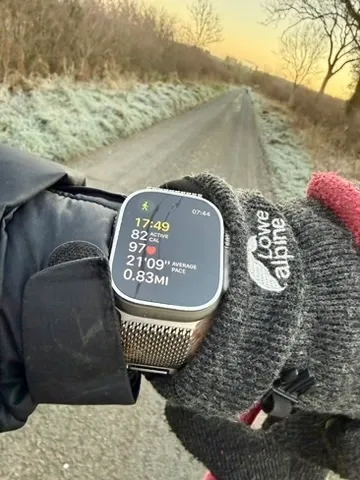
On a recent 2hr 41min winter hill walk in freezing conditions, the battery dropped from 65% to 47% — an 18% reduction. My old watch would not have survived.
The larger, brighter screen makes mapping, messages and email genuinely usable. The titanium case and sapphire glass feel properly durable. It still deserves care, but this should look respectable after years of normal use.
The Action Button is simple but genuinely helpful. I use it to start workouts. Small thing, big difference when you log at least two sessions a day.
The outdoor features are not gimmicks. Compass Backtrack and Waypoints are genuinely useful in fog, on tidal beaches, or when marking a launch point while kayaking. Cellular connectivity means I can head out without my phone and still feel safe.

Health and Vitals
Sleep tracking is excellent. Apple’s Vitals feature now monitors wrist temperature, breathing rate, heart rate, blood oxygen and more. After a few days it learns your baseline and flags deviations.
It has already proved useful. After a heavy meal and too much wine, I saw a noticeable dip in overnight blood oxygen. Before a cold, it detected a raised temperature before symptoms appeared.
It doesn’t diagnose conditions, but it highlights patterns. Over time, that insight adds value.
The Milanese Loop
I made a mistake ordering the blue Ocean Band. It just wasn’t classy enough for a watch like this.
I replaced it with the natural titanium Milanese Loop and wish I’d chosen it from the start. It’s warm to the touch, light, breathable and looks superb. I’ve only taken it off to charge the watch.
If you like the Milanese Loop, order it with the watch and save yourself £100.
The Quirk
If you wear it in the bath, it congratulates you on a 9cm “dive” and tells you the water temperature. It also triggers Water Lock automatically, which is mildly irritating.
It’s funny the first time.

Downsides
- It’s large. Try one on before committing.
- Apple straps are expensive.
- If you’re mostly sedentary and indoors, this is overkill.
Verdict
Strong recommendation.
If you’re physically active and spend time outdoors, this stops being a smartwatch and starts being equipment. The battery life alone changes how you use it. Everything else builds on that.
If you’re considering one, you probably won’t regret it.
You can see the exact version I use on Amazon via this button:
As an Amazon Associate, I earn from qualifying purchases at no extra cost to you.
I buy all my own gear and write independent reviews. If you found this helpful, buy me a coffee.
Thanks for reading, I’d love to read your comments.
Leave a Reply