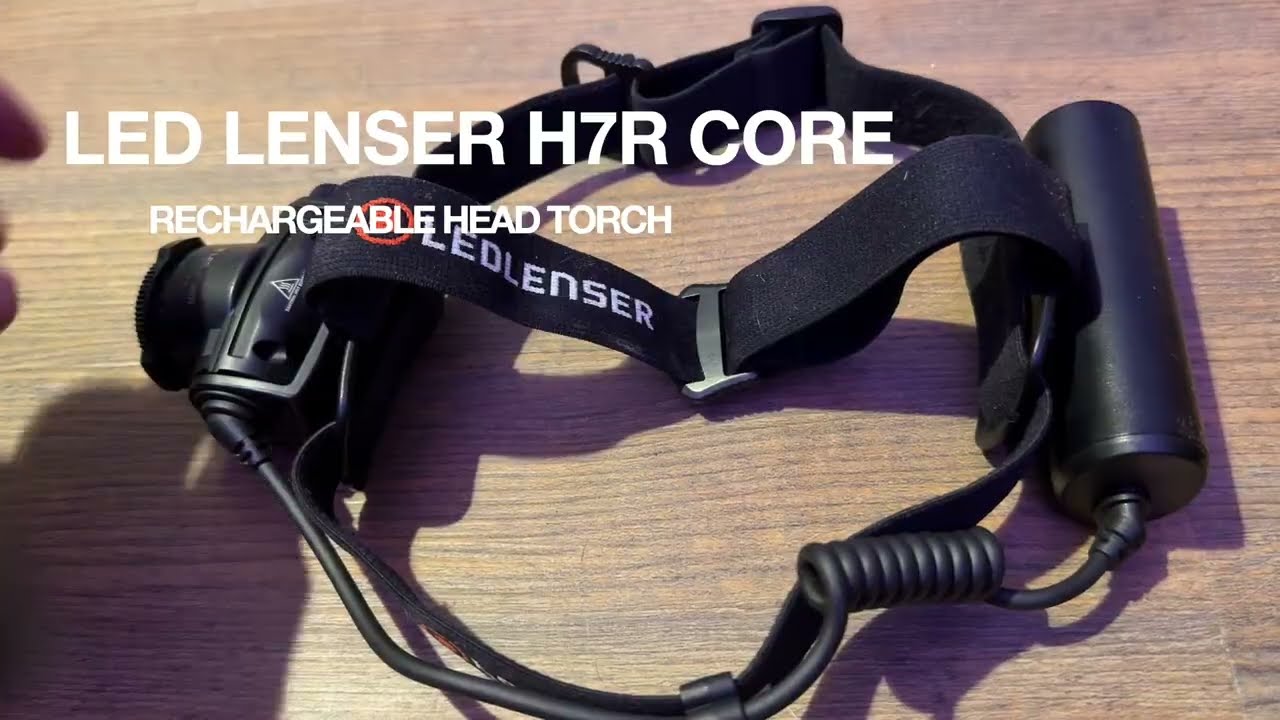
The Ledlenser H7R Core is a waterproof, rechargeable head torch with a high powered fully adjustable beam. I’ve had mine for almost a year and used it heavily. I can honestly say I look forward to using it and it lets me get on with all the things I need to do in the dark. I only review things that I’ve bought with my own money and tested fully. I recommend this torch to anyone else who is more than just a casual user.
(Affiliate link, I may earn a small commission if you buy via my link but at no extra cost to you)
Video demonstration of the torch features, controls and effectiveness in the dark
Why I chose the H7R Core
I am a very demanding torch user; I get through a lot of them, and I’m quite hard to impress. I live in a rural part of the Lake District, we get frequent power cuts, I do a lot of camping, I walk my dogs twice a day, every day of the year, and I work full time. As you can imagine, this means I’m often dependent on a torch. I find head torches vastly more practical for most situations, though they tend to be less robust than handheld ones.
I used to use a Black Diamond head torch, but I was never that pleased with it. The buttons were not intuitive, the batteries were part of the light unit, making it feel unbalanced, and after I dropped it, it died.
With a clear sense of what I didn’t want, I decided on the Ledlenser H7R Core.
Pros:
Waterproof and dustproof (IP67 rating – dustproof and capable of surviving temporary shallow immersion). It feels rugged.
Rechargeable – no need to carry spare batteries around and it has power remaining LEDs.
Battery pack sits separately to the lens for better comfort and balance.
Simple analogue controls work well with gloves.
Adjustable brightness, tilt and beam angle.
Travel lock stops it turning on in your bag.
Very bright (if you want it to be) – up to 1,000 lumens.
Decent battery life (if you don’t run it on high power for too long).
Seven-year manufacturer’s warranty (if you register it).
Battery is removable and in theory replaceable.
Cons:
Not the cheapest; however, I am happy with what I paid for mine.
Recharge time takes a while (3.5 hours from empty) – fine if charging overnight, less so if you’re on the move.
Charging cable is bespoke – not USB-C, so it’s another cable to carry (or lose).
The claimed maximum power of 1,000 lumens needs caveating – see below.
It weighs 259 g – for comparison, an iPhone 16 Pro Max weighs 227 g. It’s not ultralight, and it takes up a reasonable amount of space.
This is the charging cable / system. The magnet is not very strong and it can get knocked off quite easily but it’s never been an issue for me.
The 1,000-Lumen Boost Explained
The power ranges from 15 lumens (enough to read a book when you’re in your tent) up to 1,000 lumens, which is very bright indeed, with a range of 250 metres. However, the maximum rated normal output is 600 lumens, which still provides a 200-metre range. That is more than enough for everything I’ve ever needed.
If you want to use boost mode, turn it on as normal, then double-tap the power button, and you will get a 10-second power surge. It will then drop back to the previous setting.
It could be useful, I suppose, but in all honesty, I’ve never bothered with it.
Power button surrounded by power dial. Focus ring is on the front of the unit.
Controls
Power button – press once to turn it on, press again for reduced power, and press again to turn it off. For boost mode, see above: press once to turn it on, then double-tap for a brief increase. The button feels solid and is easily located in the dark or with gloves on.
Brightness knob – nicely ribbed and surrounding the power button. It is not mechanical; it will turn infinitely without a stop. It adjusts beam intensity and is very granular, offering fine control. Turn the power down for reading / close work and up only when you need the extra range.
Focus ring – sits around the bulb unit and has ribs and three large lugs. Its range of motion is only about 10 degrees. It offers excellent control, from a wide-angle floodlight to a narrow beam for distance work.
Tilt – the whole lamp unit tilts vertically, so you can position it accurately whether you’re doing DIY or searching for your dog. It will do what you need.
This is the supplied battery next to a normal AAA for comparison.
Verdict
I have used mine for daily dog walks, canal-side runs, DIY and a five-day autumn wild-camping trip to Croatia. It’s been superb, a real workhorse and totally reliable. I enjoy using it, look forward to my walks in the dark, don’t have to keep buying batteries or carrying spares, and don’t have to worry about the weather. I recommended it to my friend Nick, and he ended up buying a second one for his wife.
I tend to use it at almost full power for approximately 1.5 hours a day in winter and recharge it every couple of days. I’ve never actually had it go flat on me because there are LED power indicators. On one occasion, when the battery was almost exhausted, the light flashed and dropped to a much lower brightness.
If you’re in the market for a premium head torch that you will look forward to using, this should be on your shortlist.
Here’s me wearing my torch on a recent wild camping trip to Croatia.
From 60 metres out, I started to think that maybe the group of people on the beach might be naked. Their bodies were a remarkably consistent colour, all of them. Not a hint of fabric.
There was nowhere else for us to land so we paddled closer.
Yep. Definitely naked. Three generations by the look of them.
A hirsute, confident lady in her fifties sat on the pebbles, arms back, palms on the ground, legs bent at the knee. She was pointing it directly at the setting sun.
We ignored them as best we could and aimed for the opposite end. They all stared at us as if we were the weirdos!
The beach was made of rounded-off white cobbles, peaty soil and a little orange sand. With so little tidal movement, there were established plants dotted all over.
We pulled the kayaks to the tree line and put our tents up. After about 45 minutes the nudists departed – swimming back to a chartered yacht anchored in the bay.
We now had the place to ourselves; we celebrated with a swim and many cans of beer.
This was only day two.
Day 1: 15.5 km; Day 2: 35.8 km; Day 3: 28.4 km; Day 4: 25.8 km; Day 5: 18.0 km.
Planning your own kayaking trip to Croatia?
This is the story of five days exploring the islands around Split with my friend Nick.
Forty-eight hours earlier, Nick and I were tucking into a shepherd’s pie at his place in Bedfordshire, poring over weather forecasts and maps. We had booked a five-day self-guided sea kayak expedition with Red Adventures, a company based in Split, Croatia. They would provide us with kayaks, camping kit, maps and local advice. We were already on version two of the route owing to a substantial wildfire on the island of Brač. There was a stream of WhatsApp messages flying back and forth between me and Dejan, our guide.
Our flight was at 0620. As we approached Split airport, I recognised all of the places we planned to paddle to out of the window.
Nick can’t remember much about that.
We were met by Mario from Red Adventures. I had wondered how we would recognise him, half expecting a man with a sign saying Robert and Nick. But actually, it was a Vauxhall Vivaro with two upturned sea kayaks on the roof that led us to him.
He dropped us off at Lidl so we could stock up on essentials. This was mostly beer and water, suncream, crisps, snacks and some tins of fish just in case.
The Red Adventures kit was then explained and handed over: two sleeping bags, two roll mats, two kayaks, three paddles and one tent.
“Wait a minute,” I said.
“We ordered two tents.”
A look of confusion swam across Mario’s face. He’d imagined this was a very different kind of trip. He drove back to Split to fetch us another tent while we put everything into dry bags and set up the kayaks.
They were decent boats. Well used but strong and plenty of life left in them. They had rudders which neither of us had used much before. We managed to fit everything in with space to spare and set off.
Day 1 – Trogir to Drvenik Veli
The recommended route was to paddle out of Trogir Bay, follow the mainland coast for several kilometres and then cross to Drvenik Mali for a beach wild camp.
I made a bit of a mess of that before we even left the bay. Father Ted explains it much better than I ever could – it’s hard to tell if you’re looking at small rocks that are close by or big islands that are far away! Without any real sense of where I was or what I was looking at, I’d changed route anticipating the islands were a lot closer than they actually were. The map didn’t yet mean much to me without the familiar OS grid squares.
One of several motor boats that passed close by on this crossing. At least they waved at us.
We found ourselves about 2km from land just as the wind picked up. I should introduce the Croatian wind at this point. Before we got there, we were told that the winds all have their own names. I had given very little attention to this seeing as I live in the Lake District. Surely wind is wind? Wrong! The wind we experienced on this crossing was Maestral. Our guidebook says:
“Although not dangerous as Jugo and Bura, it can be quite tiring and joy killer.”
It was indeed. We never felt at risk, but the waves were big enough to become the main event, and the headwind made it feel as if we were paddling uphill. We were still getting used to the boats, and on two hours’ sleep the crossing felt gruelling.
We diverted around a headland into a village called Drvenik Veliki which, confusingly, has almost the same name as the island it is situated on: Drvenik Veli. We were within sight of the island we were supposed to be going to – Drvenik Mali.
There was not a soul to be seen as we pulled the boats up the slipway. Half a dozen fishing boats were moored, a couple of vehicles parked up.
Some links in this article are affiliate links. If you book or buy through them, I may earn a small commission at no extra cost to you.
Not fancying the crossing, we spoke to Red Adventures for advice and within minutes, they had us booked into a smart, modern apartment (affiliate link) 100 yards from where we landed. €90 for the night, cash. A bargain under the circumstances.
Front door
Interior view
I got the bed this time. Nick owed me after I took the caravan in a barn on our last trip. He took the sofa.
That evening we ate like kings at Prsuta3 By The Sea, an authentic, busy little pizza restaurant. Neither of us thought to take our torches with us. It was dark by the time we staggered home by the light of our iPhones.
Day 2 – Drvenik Veli to Drvenik Mali
We had breakfast from the bakery and then paddled clockwise around Drvenik Veli (the island). This was a totally different experience, hardly any wind, flat seas and bright sunshine. We started to warm to the boats and I managed to get used to the gridless map we had been given.
The Blue Lagoon was teeming with motorboats and trendy young people so we left them to it and carried on.
Just around the corner we found this little cove and stopped for some cliff jumping and snorkelling.
Taking it in turns to jump off the cliffs
We aimed for the village of Uvala Borak over on Drvenik Mali hoping for lunch, but it was like a ghost town, everything was shut with no sign of re-opening.
Things improved on the south coast where I enjoyed one of the top ten steaks of my entire life at Rina Mare even though the waiter did give us a lot of side eye for our damp clothing. The padded upholstery was snatched off the chairs before we were allowed to sit down.
We had an excellent evening, the family of nudists adding an extra layer of interest.
The campsite was very well used. It’s a shame there has been so much toileting in the woods, Nick and I debated who might be responsible. My theory was yachties; Nick thought they would use the “heads” on board. The issue was to be well and truly settled the following evening.
Day 3 – Drvenik Mali to Šolta
We stopped for lunch at Maslinica, an archetypal Croatian village on the island of Šolta. We landed on the beach, carefully avoiding swimmers and sunbathers, then walked down the narrow road past a bakery, numerous café-bars and tourist shops. The harbour water was pristine and teeming with small fish; the whole place had a great atmosphere.
After another steak and chips, we stocked up on essentials at the supermarket. I noted with some satisfaction the young lad on the till bollocking a group of youths who tried to walk in wearing beachwear. I’d read about this on the internet: apparently, it’s a terrible faux pas here to go into shops uncovered.
The wind really picked up as we headed out again. This time it was coming from the south, meaning the waves not only hit us side-on but also had a good 100km of open sea between us and Italy to gain momentum. The coastline was mostly sheer cliffs, we had to paddle 100m or so out from them to reduce the bounce back effect. Progress was very slow, one wave in 20 was supersized and required us to make a sharp turn to try and take it head on.
The water was warm, it felt less threatening than the same conditions would in Scotland where we normally paddle. I’d say it was 90% exhilarating, and 10% concerning. I ended up paddling on full right rudder with most of my strokes on the left side to work against the driving waves. Nick and I totally lost sight of each other in the troughs, and it was difficult staying a sensible distance apart.
Kayakers use the word “committed” at times like this. We had come a long way from the safety of Maslinica and were now more than halfway to our destination. Turning back would have been riskier than carrying on. Nothing for it but to try and stay upright, have eyes in the back of our heads and keep paddling forwards.
I have quite a relaxed paddling style, which means I can let the boat pitch and roll beneath me without it affecting my centre of mass too much. It also enormously helped that the kayaks were heavily loaded with beer and fresh water after our supermarket stop. This meant they were far less easily bullied by the waves.
We stopped for a rest twice when there were gaps in the cliffs. There was not much signal and it was hard to get a refresh on the weather forecast.
We spent half an hour here trying to guess the purpose of these structures. We agreed that, with no disrespect to the owners, this was not the kind of place a lady would ever visit consensually.
Eventually, we made it to Tatinja Bay. Our guidebook suggested the middle “sleeve” for camping. As soon as we turned 90 degrees to the waves, they picked us up and surfed us forwards. The rudders made this excellent fun! I rammed the beach at cruising speed and partially capsized getting out. We just sat there for 10 minutes, grateful to have made it.
There was a fallen tree on the beach which we used to hang our kit on. The guidebook suggested camping on the stones, but we didn’t fancy that, so we explored the woods behind.
There was a deep, stone lined pit just behind the beach, I initially thought it was a water cistern, but I’ve since researched it and think it was a lime kiln. There are a lot of them near where I live but they look quite different! Sadly this one had been used as a landfill, mostly plastic marine waste but also general rubbish. Things were not a lot better once we stepped into the woods – every clearing of the trees was covered in stained toilet tissue. Someone had even threaded a loo roll over a twig for an extra degree of convenience! The map showed a restaurant in the next bay but neither of us fancied climbing the steep, turd strewn path up through the woods so we decided to stay put.
Whilst we were unpacking, a sailing yacht anchored up 100m or so out into the bay. A small rubber dinghy with an outboard motor separated from it and headed our way. The waves were still substantial even in the shelter of the bay. This made no sense at all, there was nothing for them here!
The penny dropped when they landed awkwardly and waddled into the woods behind us in a rather sheepish fashion. Three minutes later they were off, one of them deciding to swim back. I mentally saluted his commitment to hygiene and consideration for his cabinmates, if not for his visit to our beach.
Five minutes later, a man and a woman swam ashore from the same yacht. They stood up in the shallow water and shuffled backwards onto the beach before taking their flippers off. They spoke English and, after a bit of awkward small talk, flippered away again in search of somewhere a bit more private.
We made the best of our home for the night. Nick found an abandoned camping roll mat which we split in two and used to lie on our backs on the stones drinking beer and spotting shooting stars and satellites. It was a magic moment, especially when the moon came out. We were treated to distant thunder and lightning. By the time the rain started we were ready for sleep.
Day 4 – Šolta to Čiovo
We had a good night’s rest and the weather was perfect when we woke up. We debated our options with our guide over WhatsApp. The forecast was still worrying, with strong southerly winds expected again, so the advice was to head back towards Split and remain in more sheltered waters. We were torn because we had set our hearts on paddling to the Cold War submarine tunnels on Brač. We already knew that wildfire had affected that entire stretch of coast the week before, but we had hoped to see it from the sea. The tunnels were about 21km from where we were, and we would have been badly exposed if the forecast proved correct.
We took the sensible option and followed the advice from Red Adventures. After crossing from Šolta to Drvenik Veli, we faced the 6km open crossing to Čiovo.
It was absolutely flat calm, so much so that we overtook a sailing yacht. We felt a little cheated because we could easily have reached the submarine tunnels in those conditions. That’s kayaking for you.
We decided to spend the night on a commercial campsite, “Camping Labadusa” which was very handy being adjacent to three bars and just behind the beach.
We had a delicious evening meal at Konoba Dida Ivo – mixed grill and chips followed by another round of beers and a game of cards at Konoba Labadusa. A really fun night as we were nearly at the end of our trip, we had made some great memories and the pressure was off. Nick told me about a friend of a friend who had been worried about a substance misuse test. He visited a beautician’s and had every single hair removed from his body, eyebrows the lot.
“Imagine turning up to work like Morph.”
This really tickled me.
As we finally got to bed, a group of young people seemed to be hell-bent on forming a polycule about 6ft from our tents at the top of the beach. None of them were English but it was their common language, so they spoke loudly and slowly. It was quite embarrassing after a while, and I was building myself up to having a word when Nick beat me to it. He very politely pointed out they were next to a campsite and asked them if they would mind perhaps moving down the beach a little. They were good natured.
Day 5 – Čiovo to Split
We both felt a bit sluggish, a combination of not enough sleep, too many beers and four days on the water. If we were not heading home, today would have been a natural point to stay on land for a rest.
Our suggested route included a couple of discretionary diverts but neither of us felt like doing them so we soldiered on heading directly for Split itself. The south coast of Čiovo was unremarkable, we paddled into the bay for a look at the main town – Okrug Gornji.
There were few signs of life, just a couple of joggers. Some buildings had large, black cylinders on their roofs; we concluded they were solar water heaters. We stopped for a rest at Beach Leo, crisps for breakfast again!
The crossing from Čiovo to Split was 2.1km. From there, we could see almost our entire route: Trogir, where we had started; the islands we had visited; and the one we had not quite reached.
Our guide had dropped a pin on the map at Plaža Prva Voda, just beyond a swimming area on the outskirts of Split. The iconic football stadium and modern tower blocks told us we were returning to civilisation. I surprised myself by going from feeling tired and ready for the end to being incredibly melancholy as we made our final few paddle strokes. It had been a brilliant trip. We were early for our meeting, so we took our time airing some of our wet kit, got changed and then indulged ourselves in one final steak and chips at Restaurant Lučica.
The Verdict – Five Days Kayaking in Croatia
Would I recommend a self-guided sea kayaking trip in Croatia? Absolutely. We had a thoroughly enjoyable five days. However, I would only recommend the self-guided option to experienced, safety-conscious sea kayakers. You need to be comfortable managing physical risk and some legal uncertainty, particularly around wild camping and offshore kayaking in Croatia. If you are in any doubt, choose one of the guided options instead.
How much did our Croatia kayaking trip cost?
Item
Per person
Red Adventures
€450
Food, drink and accommodation
€500
Flights
£200
Total
€950 + £200
The €450 we paid Red Adventures included single sea kayaks, upgraded carbon fibre paddles, tents, sleeping bags, inflatable roll mats, cooking equipment, maps, airport transfers, PDF guidebooks provided in advance, storage of our flight cases and crucially ongoing support and advice based on weather and our progress.
We spent another €500 each on food, drink, campsites and our unexpected night in an apartment. We certainly didn’t go hungry or thirsty. Most evening meals, including drinks, came to around €90 for the two of us.
We paid for everything ourselves. This wasn’t a sponsored trip, and Red Adventures didn’t know I was planning to write about it.
What worked well
The planning and support
We were very honest with Red Adventures about our experience and capabilities. This allowed them to balance adventure with safety, particularly when the weather became challenging.
We did our best to follow the instructions, kept them updated with our location and gave accurate accounts of the conditions we were experiencing. It worked very well.
The tents were functional and the sleeping bags were rated down to a positively tropical +20°C!
Electronics and navigation
We had several electronic devices to keep charged, including phones, cameras and watches. We took ample power banks and rapid mains chargers and finished the trip comfortably.
Mobile phone coverage was mostly excellent, frequently with fast 5G connections.
I’m glad we brought our own VHF radio, PLB, map case, compass and head torches, as these weren’t included in the supplied equipment. We also had a few of our own dry bags, tea bags and cups. Although dry bags were supplied, they were mostly very large and it’s much easier to pack several smaller bags into a kayak.
I have sworn by the free XC-Weather app for years and once again it was essential on this trip. I have my wind forecast set to Beaufort wind scale which is best for kayaking.
Food, water and money
We took plenty of cash and needed almost all of it. Card payments weren’t always an option, particularly on the smaller islands.
We were warned not to rely on the tap water on Drvenik Veli and Drvenik Mali. I was glad I’d brought my Sawyer Mini water filter [affiliate link], which helped us keep stocked up. It is not a desalination filter and can only be used with fresh water, such as tap or stream water. There were no streams or rivers along our route, unlike Scotland, where we usually paddle.
We also carried our passports, which we needed when checking into the campsite.
The Croatian sea
The water was dramatically warmer than we’re used to. That made swimming, snorkelling and generally messing about in the sea much more enjoyable. It also made the rougher conditions feel less intimidating, although warm water doesn’t make big waves any less capable of causing trouble.
What would I do differently?
Have a settling-in day
Going straight from the plane onto the water and into fairly challenging seas after two hours’ sleep wasn’t ideal.
We’d never paddled these particular kayaks before, we weren’t familiar with the geography, and we were carrying five days’ worth of equipment.
A day to get used to the boats, explore Trogir, rest, charge our devices and generally get ourselves organised would have been sensible.
As it turned out, we ended up doing almost exactly that by default when the weather forced us to stop at Drvenik Veli. Next time, I’d plan it deliberately.
Paddle fewer kilometres and explore more
This is probably my biggest regret.
We were so intent on following the routes and making progress that we didn’t stop to investigate enough of the interesting things we passed.
There were villages, little harbours, ruins, war relics and places we could easily have spent several hours exploring.
Things to know before sea kayaking in Croatia
Camping isn’t straightforward
There aren’t that many suitable places to camp, particularly if you’re looking for somewhere accessible directly from the sea.
Wild camping is generally prohibited in Croatia, although our guide explained that it is tolerated in remote locations. That shouldn’t be taken as permission, and it’s worth checking the rules before planning an itinerary around it.
Some stretches of coastline are very exposed
There are long sections of coastline, particularly along the southern sides of the islands, where landing is difficult or impossible.
The cliffs can continue for kilometres without a beach or sheltered inlet. This makes careful route planning and attention to the weather essential.
Offshore kayaking regulations are surprisingly restrictive
The published Croatian maritime regulations generally restrict kayaks to within 300 metres of shore during daylight only, with provision for longer crossings when accompanied by a suitable motor-powered vessel.
In practice, independent sea kayakers continue to make crossings between the islands, but I haven’t established whether any exemptions or other arrangements apply to self-guided expeditions like ours.
If you’re planning a similar trip, I’d strongly recommend checking the current requirements and making sure you are comfortable with any risks. Also think carefully about the requirements of your travel insurance policy.
Language and people
Everyone we met spoke good English and was generally very welcoming, if occasionally a little cautious at first. It helped that we’d practised a few words of Croatian – bok (hello), molim (please) and hvala (thank you). Our pronunciation was dreadful, but people generally smiled at our efforts and seemed to appreciate them.
Would I do it again?
Yes, without hesitation.
If you would like to learn more about some of the kit I used on this trip, here is my list:
If, like me, you have hobbies that might result in being winched onto a helicopter, read on!
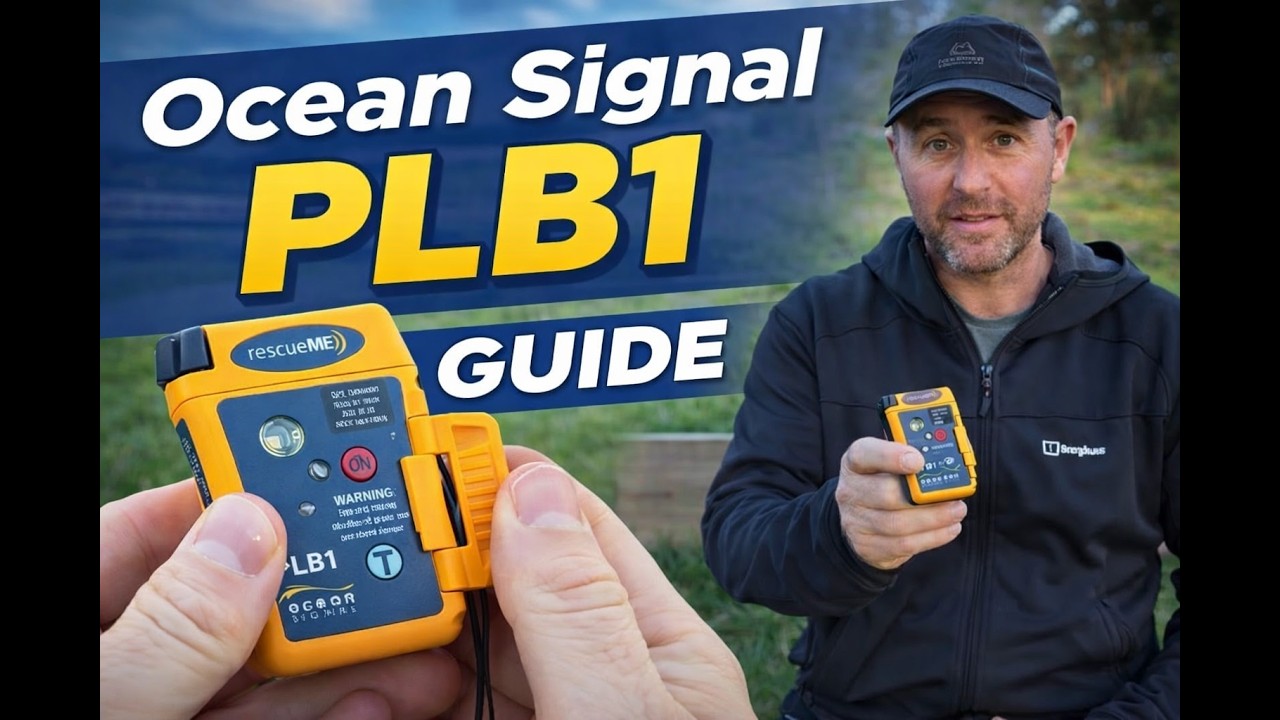
In a nutshell, if you find yourself in grave danger anywhere in the world, this device can send a distress signal to a satellite. It needs no subscription, phone signal or recharging. Provided you’re conscious, can reach your PLB1 and can use at least one hand, you have hope of rescue. The Survivor’s Club stories on the Ocean Signal website include many accounts of lives saved.
I bought mine back in 2019, when I first got seriously into sea kayaking. It came before the VHF radio or LED flares, on the basis that it was the most versatile way to get help when you really need it. I’ve carried it tethered to my buoyancy aid while kayaking and in the lid of my rucksack for hill walking ever since. I’ve never had to use it. Yet.
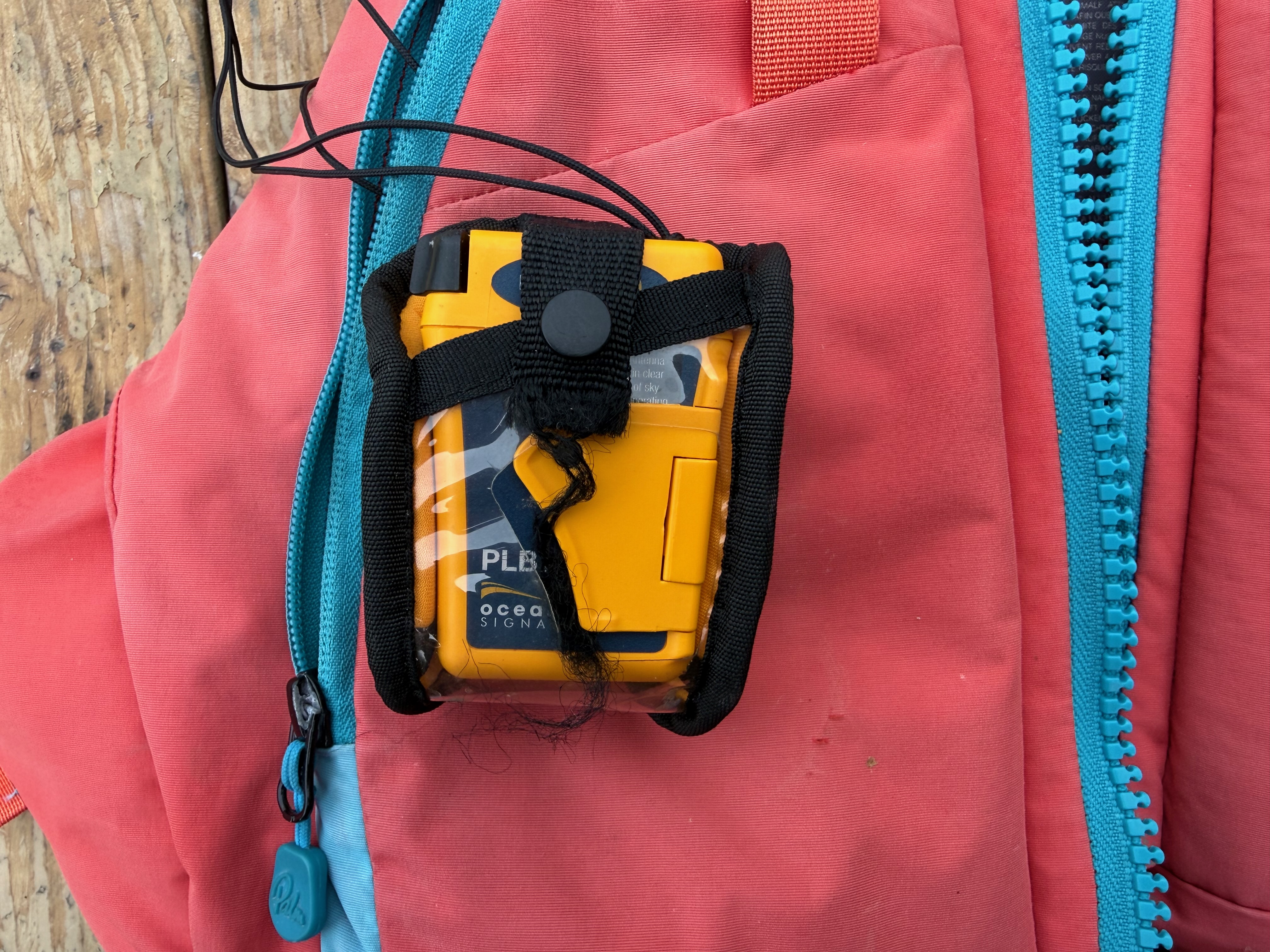
PLB1 in the pocket of my Palm Peyto buoyancy aid. There’s a small eyelet inside the pocket which I thread the lanyard through to avoid losing it.
The PLB1 is a UK made, small, purpose-built device. As the name suggests, it’s ‘personal’ – not for attaching to a vessel or aircraft, you need it on you. It is also not for two-way communication, sending locations to your family, getting advice or checking the weather forecast. It has one job only – getting help in an emergency. No screen, just two buttons – TEST and ON. It fits easily in the palm of my hand (77 x 51 x 32.5mm weight 116g).
My PLB1 – Test and On buttons shown, LED indicator and white rescue strobe at the top.
You do need to register your device (for free) via this government website. I’ve just been prompted to re-do and update mine, it took 10-15 minutes. You will need the beacon’s Hex ID or Unique Identifying Number, the manufacturer serial number and model (all stamped on the device), your contact details, and a trusted person or persons who can explain what you’re probably up to. And who are probably not with you and in the same trouble! This step is essential for the rescuers: they need to know whether to look for a kayak, gyrocopter or hiker, and to check whether an alert is genuine.
A short demo of my PLB1 including extending and rewinding the aerial.
Should you press the ON button, it waits 50 seconds and then sends a 406 MHz radio signal into space. A satellite receives the signal and alerts a ground station. A professional assessment is then made as to what kind of help is required based on where the signal is coming from i.e. land, water, mountains etc and the registration details you gave. The most appropriate emergency services are informed i.e. coastguard / mountain rescue / police.
If it can lock onto GPS, it will send your location (accurate to within 100m). Even if it cannot get a GPS fix, the satellites can locate you to within 5 nautical miles by radio alone. Once active, it sends out a 121.5 MHz homing transmission which rescuers can lock onto. It also has a small, white LED strobe to attract attention. It will keep transmitting for over 24 hours if the battery is in good order, potentially less if it has been used. The 50 second delay is to give you time to cancel if you have made an accidental activation.
How to use it:
Pull out the antenna until it will go no further
Point the antenna vertically
Open the safety flap
Press the on button for approximately one second until the Green LED flashes.
The LEDs will then flash periodically to confirm transmission and GPS status.
There is a radio test feature which you are encouraged to do monthly and a more power intensive GPS test to perform annually. They ask that you only do this in the first 5 minutes of every hour as courtesy to aircraft (it transmits a short burst on 121.5 MHz, see instructions for details).
False alarms, deactivation:
It’s quite hard to set it off by accident because there is a hinged plastic flap covering the buttons. If you need to turn it off either because you’ve been rescued or because you’ve set it off in error, just press the ON button for one second until the red light flashes twice. Release, wind the aerial back in and call the UK Coast Guard.
It’s not designed to work in or under water (it’s waterproof to 15m, it just won’t reliably transmit). You will need to hold it up out of the water if you are floating.
You don’t receive any confirmation that help is on the way or even that your message was received, it’s purely one way.
There is no way to specify the kind of emergency – could be an important factor if you’re at risk of danger from other humans vs medical / sporting accidents.
The built in battery has to be professionally replaced every 7 years, the expiry date is printed on the case and there are various service centres around the UK.
Satellite enabled smart phones and watches
Since I got this device, mobile phones and even smart watches have developed satellite connectivity. I’ve given some serious thought to whether I still need to carry my PLB1. For me personally, I definitely still do, though I think for a lot of people, the watch / phone uplink would be sufficient for peace of mind. Provided you can get an unobstructed view of the sky, it’s not wet and you have sufficient battery remaining, a consumer device could solve the problem. If you’re on the fence about that then definitely read this page on Ocean Signal’s website PLB1 vs iPhone Emergency SOS: Which Device Should You Really Trust When There’s No Cell Coverage
As they say, phones are more likely to be lost or damaged in whatever catastrophe led to the problem, their batteries are fickle, they don’t work all over the world, they don’t like wet hands, they don’t have a homing transmission for the helicopter, they won’t keep transmitting for 24 hours and you usually need to tap or type to make your request. On the plus side, there is two-way communication and you’ve probably already got it for free (though Apple did hint at a service fee after the first 2 years).
I daresay consumer satellite tech will save a far greater number of lives due to sheer numbers of devices out there. They are undoubtedly a great idea. In many situations I would try my watch or phone first because they provide two-way communication. Nevertheless, I am certain they are not a complete replacement for the PLB1 in my use case.
My flotation device and essential safety kit
Have things moved on in 7 years?
Having had my PLB1 a while, I looked online to see what alternatives there are now. Garmin make a small device that has some amazing two-way features but it does require a monthly subscription to use. There are one or two other similar small PLBs for example, the ACR ResQLink 400 and McMurdo FastFind 220. These appear to offer similar capabilities to the PLB1.
Conclusion
This device is a permanent fixture in my risk assessments for my trips and adventures. I have had some amazing experiences and made memories that will last a lifetime because of the confidence it has given me. If I ever find myself separated from my kayak floating in the sea or taking a tumble off Striding Edge, it will be the very best money I ever spent. If mine was lost or broken it would be replaced immediately without question.
If you expect people to listen to you when you speak, the very least you can do is give them the courtesy of good quality audio. There is nothing worse than being distracted by someone who sounds as if they are talking into a yoghurt pot. It’s hard enough as it is to hold people’s attention on a video call, and you definitely don’t want to be less interesting than their inbox.
With that in mind, I decided to upgrade my setup.
I looked at various options, including Bluetooth headsets and dedicated Microsoft Teams products, but after a fair bit of research, mostly on YouTube, the RØDE NT-USB Mini kept standing out. RØDE are a well-respected brand, and this particular mic is keenly priced for what it can do. I’ve embedded a short demo video below so you can judge for yourself, but to my ear it makes my voice sound a lot warmer, more natural and less thin than the alternatives I tried, especially my old Plantronics headset.
I’ve had my RØDE since June 2025, so this review is based on about a year of daily Teams use at the time of writing. I’ve also found that it works very nicely with Final Cut Pro, allowing me to record voiceovers directly onto the timeline of my project. I use it with a dedicated RØDE spring-mounted arm, which was totally worth getting. It elevates the whole experience. I’d say it’s now frictionless when it comes to answering a call, swinging it into position and folding it away tidily when not in use.
I genuinely enjoy using this mic. If you position it fairly close to your mouth, it makes you sound at your best. I definitely now find myself speaking more slowly and with far greater confidence.
The mic itself sits in a metal U-shaped mount. It comes with a detachable magnetic desk stand. The stand is well made and stable enough, but I didn’t really get on with it because it left the mic a bit too low for my setup. That is why I switched to the arm, which suits me much better.
On the front there is a rotary volume control that also lets you switch monitoring on, so you can hear your own voice through headphones without distracting delay. Once you’ve used that properly, it is hard to go back. It makes speaking on calls or recording voiceovers feel much more natural.
Round the back, you get a USB-C connection and a 3.5mm headphone socket. I paired mine with an old set of wired Sony noise-cancelling headphones and that has worked brilliantly. They feed my voice back into my ears for monitoring and also provide the audio for Teams and Zoom calls.
Setup is refreshingly straightforward. It is class-compliant, so on Mac and Windows it is basically plug and play, with no drivers needed. RØDE also says it works with computers or tablets, and can be used with mobile devices using the right adaptor or cable. I installed the software mainly to check for firmware updates, but for everyday use I have hardly needed it at all.
One practical point: this is not the most discreet option. I can usually keep it just out of shot on a video call, but people do sometimes notice it and comment on it. That does not bother me in the slightest, and it can actually be a useful ice-breaker, but if you want something almost invisible, a headset may still suit you better.
Final thoughts
I didn’t really know what to expect when I bought this mic. I must admit, I was in two minds about whether it might be overkill or just too eccentric. One year on, it’s one of my favourite tools and it cuts across both my work and my hobbies. If you’re on the fence, just visualise your next Zoom call and ask yourself: yoghurt pot or BBC Radio 4?
How do you spell it?
RØDE is an Australian company whose roots go back to Freedman Electronics, founded in Sydney in 1967 by husband-and-wife Henry and Astrid Freedman after they moved from Sweden. The RØDE brand came later, and the Ø is a nod to the family’s Scandinavian connection rather than a standard O. It is pronounced Road, although you may also see it written online as Rode or even R0de. If you are using a Mac and want to be a stickler for accuracy, try Option + O for ø, or Shift + Option + O for Ø.
Amazon UK Links
If you would like to learn more, here is the link to my exact microphone on Amazon UK and here is the link to the professional spring-mounted arm.
Amazon affiliate disclosure: if you buy through links on this page, I may earn a small commission at no extra cost to you. I only recommend things I have used myself and bought with my own money
When you’ve spent good money on decent tech, you quickly realise how dependent you are on it. Phone, watch, laptop. All useful right up to the moment the battery dies.
For trips away, especially anything off-grid, a reliable power bank stops being a nice-to-have and becomes essential.
I chose this Anker 20,000mAh portable charger. I’ve had it since December 2025, used it on several trips, and more recently put it through a fairly obsessive round of testing at home.
I’m very happy with it.
TL;DR
Kept my iPhone 16 Pro going for about 4 days
Ran out during day 5
Recharges very quickly when you get the chance
Built-in percentage display is genuinely useful- way better than the 4 vague LEDs you often get
Integrated USB-C lead is a simple but excellent feature
The last 10% does not do anything
Main features
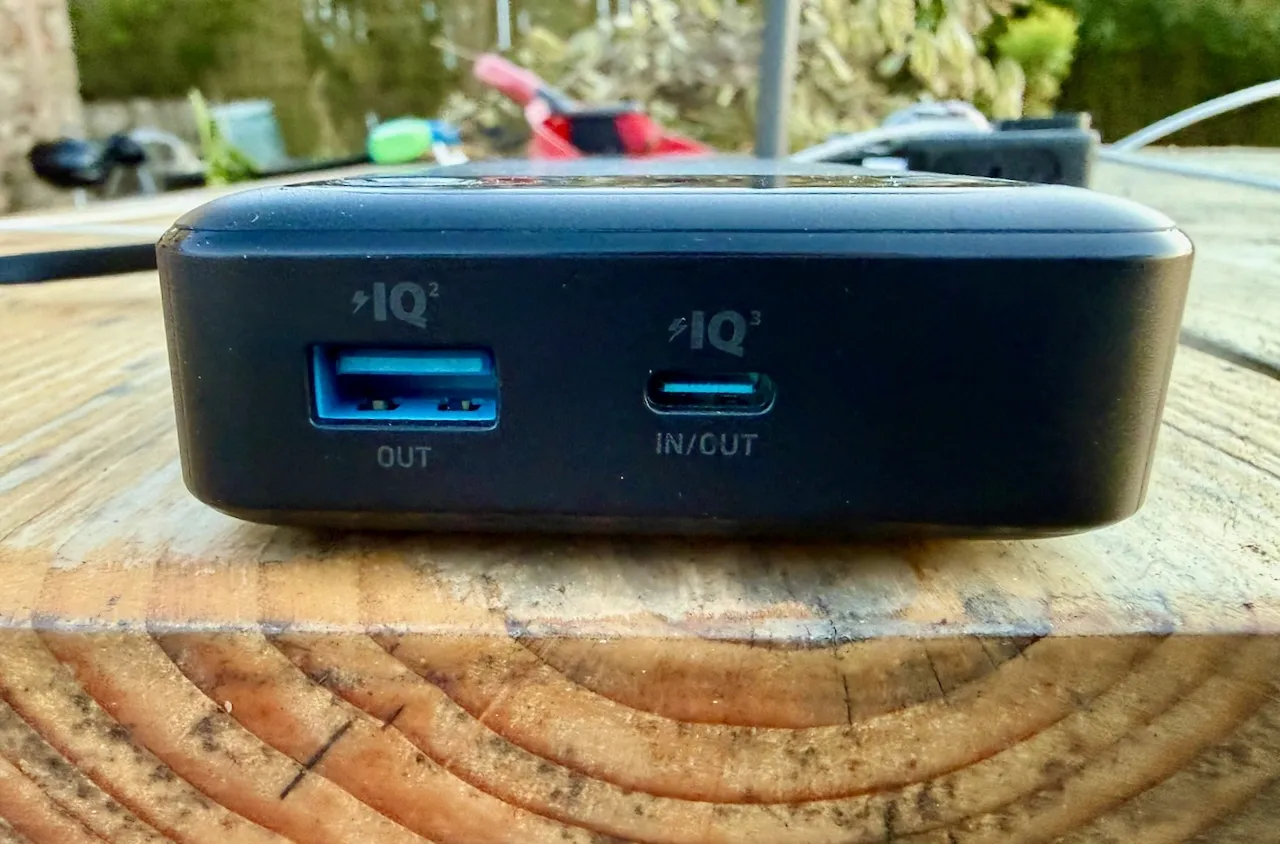
Built-in USB-C lead that can both charge devices and recharge the power bank
Fast charging up to 87W
20,000mAh capacity, roughly comparable to a MacBook Air battery in energy terms
Digital display showing exact remaining charge
Can charge up to three devices at once
Charges itself quickly, I saw around 64W in real use
Size roughly similar to an iPhone Pro in a case
Weight 421g. For context, my phone is 262g and a pint of water is about 840g
What is mAh?
Power banks are usually rated in mAh, which stands for milliamp hours.
In simple terms, it is a measure of how much electrical charge the battery can deliver over time.
So a 20,000mAh battery could theoretically supply:
* 20 amps for 1 hour
* 1 amp for 20 hours
That is useful, but not the best way to compare devices.
A better unit is watt hours, which accounts for voltage as well:
Wh = (mAh × Voltage) ÷ 1,000
Most lithium batteries use cells at around 3.7 volts:
20,000 × 3.7 ÷ 1,000 ≈ 74Wh
That gives you a much clearer idea of the actual energy available.
We have had Starlink since December 2024, it has genuinely transformed life for us. I explain more about our experiences below but if you are looking to sign up yourself, this referral link will give you a month of free service (and a small reward for me).
We live over a mile from the nearest fibre connection. Getting workable internet here has been frustrating and at times impossible, though a price worth paying for living in such an extraordinary place.
We started with BT copper. Speeds hovered around 1 Mbps on a good day. If the neighbours attempted to go online at the same time as us, it simply fell over.
We moved to Solway Communications. Initially promising – around 15 Mbps, but after a takeover the service deteriorated to barely better than BT.
Then we tried 4G. An external aerial occasionally delivered 40 Mbps. The problem was consistency. Weather and network demand ruled everything. It would fail at exactly the moment guests arrived and we tried to stream a film.
Back in 2012, patchy internet was inconvenient.
In 2026, it sits somewhere alongside water and electricity.
I work from home. Video calls must not drop. Files must upload. We stream all television. The air source heat pump follows its schedule via Wi-Fi. The Ring doorbell depends on it.
Reliable internet is no longer optional.
If fibre ever reaches us, I would reassess. Until then, we needed something that simply worked.
Installation
In December 2024, we took the plunge.
I arrived home at around 7pm to a large box of kit, and, like a child at Christmas, installed it immediately, by torchlight.
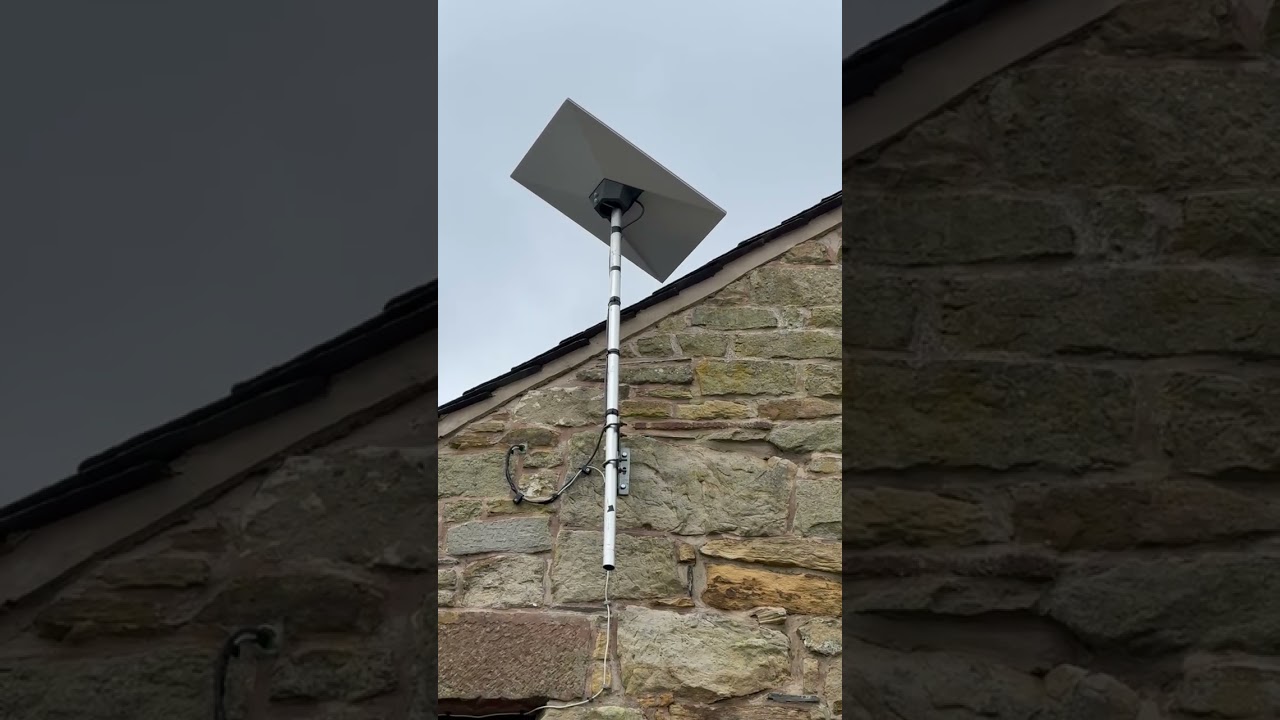
The dish now sits high on the gable end, mounted on a pole. The cable runs through existing conduit into the bedroom.
Setup is straightforward:
• Download the Starlink app
• Connect to the router
• Use the in-app alignment tool to optimise positioning
It requires an unobstructed view of the sky. Ours faces roughly south. If you’re concerned about obstructions, you can download the app in advance and use its sky-scanning tool from your proposed mounting point.
The dish sits almost horizontal and includes a built-in heater that activates automatically to melt snow — a detail that matters in the UK.
It is, essentially, install-and-forget technology.
Performance
Reliability has been exceptional.
Unlike my old EE 4G setup which required constant rebooting and adjustment, Starlink has simply stayed up. Uptime feels around 99.9%.
Download speeds:
• Typically 100–250 Mbps
• Occasionally up to 300 Mbps
• Rarely below 50 Mbps
Upload speeds:
• Usually 10–25 Mbps
We routinely run two 4K streams while I’m on a video call, with no noticeable degradation.
Speeds vary slightly with weather and demand, but nowhere near as dramatically as 4G did.
Automatic software updates occur occasionally around 3am, briefly disconnecting the service.
For remote professional work in rural Cumbria, it has been completely dependable.
Power Consumption
In normal operation, our dish draws roughly 30–40 watts.
In annual terms, 35W continuous equates to roughly 300 kWh per year. At typical UK electricity prices, that’s approximately £70–£90 annually.
It’s not insignificant. But in the context of running a rural home and compared to the productivity it enables — it feels entirely reasonable.
Wi-Fi & Integration
The router allows easy customisation of SSID and password via the app. I reused my previous network name so all devices and visiting friends reconnected seamlessly.
Coverage is good. However, due to the thick walls and layout of our converted barn, I added a £55 Starlink mesh node which has integrated seamlessly.
Cost
When we signed up:
• Equipment: ~£350
• Monthly fee: £75
There was only one plan available at the time.
Now, UK residential plans start from around £40 per month, depending on service tier and region. In some cases, equipment and professional installation are included. I’ve recently downgraded us to the “middle” package for £60 a month without any loss of function that I can detect.
Final Thoughts
Starlink has transformed life here.
It has enabled a fully remote professional career, reliable streaming, smart home functionality and general peace of mind.
It is more expensive than fibre and uses more power. But where fibre does not exist, it is not merely a luxury, it is proper infrastructure.
Since I first published this article, Fibrus have installed fibre to within 100m of our house and then given up! With no alternative plan in place we are still very gratefully Starlink customers.
A Note on the Referral Link
If you decide to try Starlink, you’re welcome to use my referral link below. You will get one month of free service and I will get a small reward.
If you’re active outdoors, this feels like equipment, not a gadget.
Why I Upgraded
My Apple Watch Series 7 had reached its limit.
Battery life was under 24 hours even when new. If you wanted sleep tracking, you had to plan your charging around bedtime. A 4–5 mile walk drained it heavily. Kayaking often meant leaving it at home and wearing my old Casio G-Shock instead. The screen had also become frustratingly unresponsive when wet.
I looked at alternatives. I briefly considered a Tag Heuer, but I didn’t want to abandon seven years of health data. Rings and other wearables didn’t appeal.
When the new Apple range launched in September, the Ultra 3 ticked every box. I ordered one immediately.
What It’s Like in Real Use
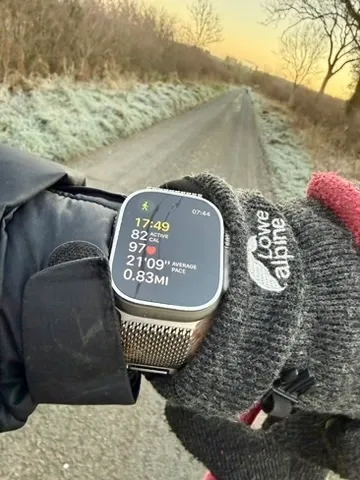
Battery life is the headline. I consistently get around 42 hours. That means full sleep tracking, workouts, mapping, and daily use without thinking about it. I charge it while drinking my first cup of tea at my desk. That’s it.
On a recent 2hr 41min winter hill walk in freezing conditions, the battery dropped from 65% to 47% — an 18% reduction. My old watch would not have survived.
The larger, brighter screen makes mapping, messages and email genuinely usable. The titanium case and sapphire glass feel properly durable. It still deserves care, but this should look respectable after years of normal use.
The Action Button is simple but genuinely helpful. I use it to start workouts. Small thing, big difference when you log at least two sessions a day.
The outdoor features are not gimmicks. Compass Backtrack and Waypoints are genuinely useful in fog, on tidal beaches, or when marking a launch point while kayaking. Cellular connectivity means I can head out without my phone and still feel safe.
Health and Vitals
Sleep tracking is excellent. Apple’s Vitals feature now monitors wrist temperature, breathing rate, heart rate, blood oxygen and more. After a few days it learns your baseline and flags deviations.
It has already proved useful. After a heavy meal and too much wine, I saw a noticeable dip in overnight blood oxygen. Before a cold, it detected a raised temperature before symptoms appeared.
It doesn’t diagnose conditions, but it highlights patterns. Over time, that insight adds value.
The Milanese Loop
I made a mistake ordering the blue Ocean Band. It just wasn’t classy enough for a watch like this.
I replaced it with the natural titanium Milanese Loop and wish I’d chosen it from the start. It’s warm to the touch, light, breathable and looks superb. I’ve only taken it off to charge the watch.
If you like the Milanese Loop, order it with the watch and save yourself £100.
The Quirk
If you wear it in the bath, it congratulates you on a 9cm “dive” and tells you the water temperature. It also triggers Water Lock automatically, which is mildly irritating.
It’s funny the first time.
Downsides
It’s large. Try one on before committing.
Apple straps are expensive.
If you’re mostly sedentary and indoors, this is overkill.
Verdict
Strong recommendation.
If you’re physically active and spend time outdoors, this stops being a smartwatch and starts being equipment. The battery life alone changes how you use it. Everything else builds on that.
If you’re considering one, you probably won’t regret it.
You can see the exact version I use on Amazon via this button:
This is a premium charger that is ideal for both travel and everyday use.
100w total power – that’s enough to run a laptop and charge 2 x other devices simultaneously
2 x USB C ports and 1 x USB A
Folding prongs for ease of transport
Live display of runtime, power usage and temperature
Outlets at the bottom – could be tight depending on how close to the floor your sockets are
In my opinion, a substantial upgrade on the chargers provided by Apple.
Trusted brand – ideal for your high value tech.
Review
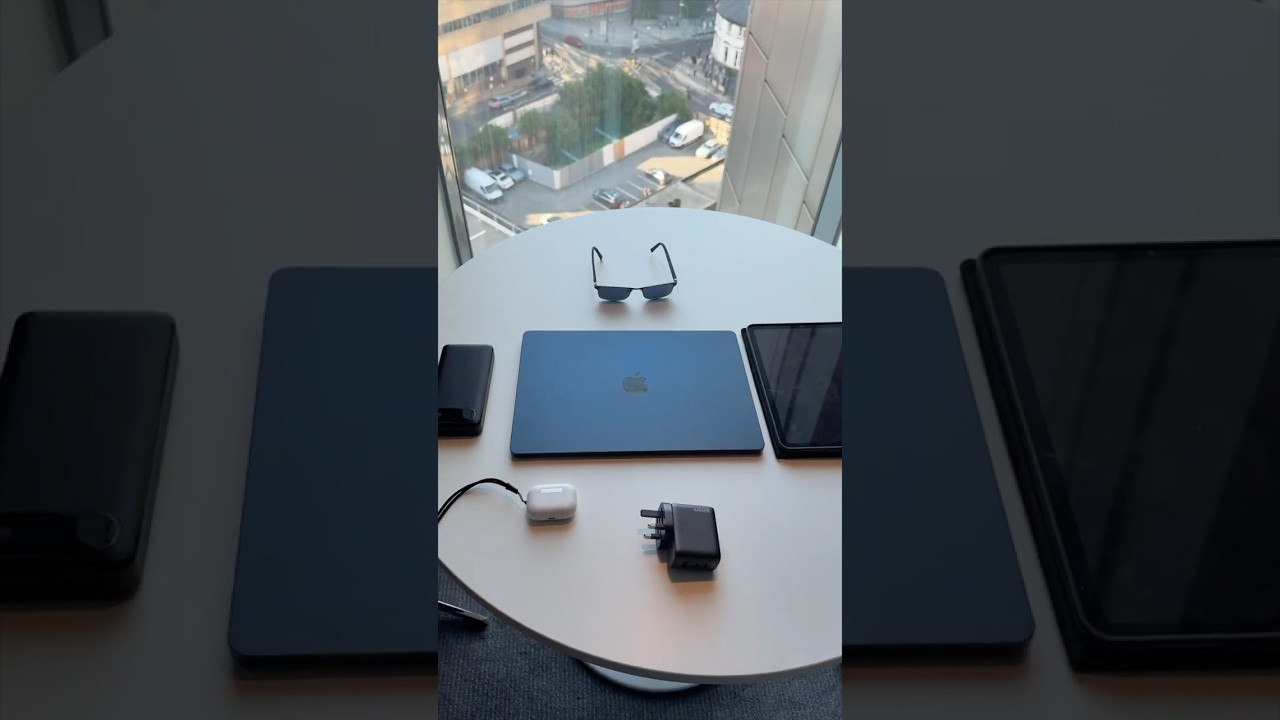
I’m away from home several times a month and I travel with a laptop, tablet, iPhone, Apple Watch and more. I previously lugged a four-gang mains extension socket around with me. I decided to treat myself to this – a single plug that can run a laptop and simultaneously charge my phone and watch.
It’s a very good quality product – reassuringly heavy. The plug pins fold flat for ease of packing. It’s got an LED readout on how much power each device is using, total running time and its temperature. It is way more powerful than the charger that comes with an iPhone or iPad. meaning you can charge up much quicker.
It uses GAN (Gallium Nitride) technology, allowing high power output from a smaller, more efficient unit that runs cooler than older silicon-based chargers
At 100W, this is powerful enough to run and charge most modern laptops while still handling smaller devices.
I have now taken this on dozens of trips and use it as my main charger, I am really impressed with it and I’d happily rely on this as my only charger when travelling.
You definitely get what you pay for, it’s a little more expensive than Apple’s own charger but it is a lot more powerful and it will run multiple devices. You can get cheaper devices of similar spec but this is not an area where you should cut corners – there is always the risk of damage to your expensive devices and the risk of overheating.
It comes with a good quality USB C-C cable.
Best for / Not for
Best for: travelling with multiple devices
Not for: charging a single phone overnight (it would be overkill)
Be mindful that the outlets are at the bottom, if your wall socket is close to a shelf / the floor it might be a squeeze for the cables. Personally I much prefer this to looking at messy wires.
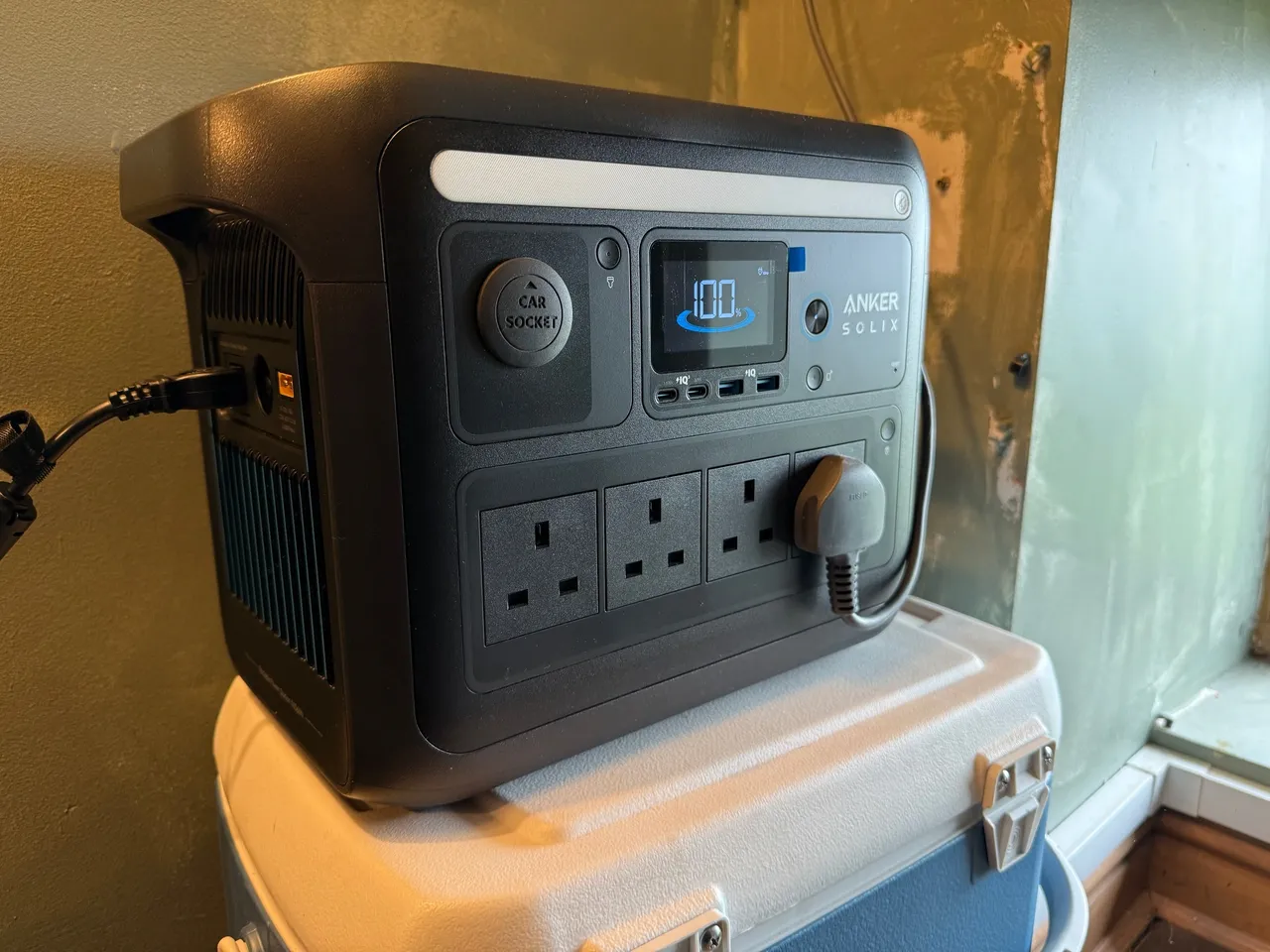
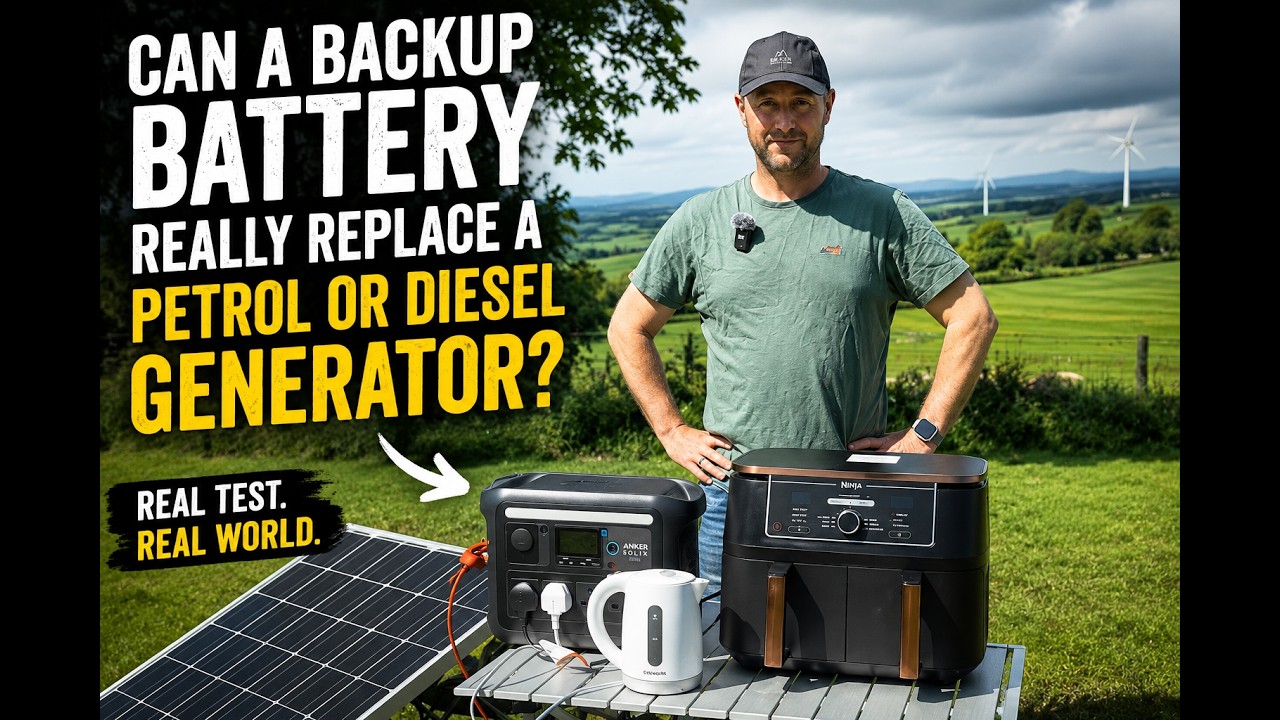
I’ve had my C1000 since May 2025, it has already kept my Starlink and office setup online through 6 power cuts
It’s portable and versatile, you can run power tools offgrid or even use it for car boot cooking
There is a newer version on sale, this one is heavily discounted and still more than capable
Anker are a high quality brand, you can trust this device not to damage your tech and to withstand normal use.
It has excellent solar integration, you can source your own panel and connect it easily
Rapid recharge time from the mains
Generous amount of sockets – USB C, USB A, 12v and 240v
It won’t run a normal kettle – it trips out at about 2kw but it will run an air fryer or hot chocolate machine easily
If you are in the market for a backup battery / generator definitely put the C1000 on your shortlist, I am very happy with mine.
Situation – why we needed the C1000 in our lives:
We live in a house sat between four fields on the side of a hill in the Lake District. We are 4.5 miles from the closest shop, a similar distance in the other direction from a pub, and right at the end of the line for power supply. We still do not have fibre broadband.
All of this is great as far as I am concerned – in fact, it’s exactly what we were looking for when we moved here. It does mean we have to be able to take care of ourselves and solve problems on a fairly regular basis.
I am a professional remote worker. I do a few different jobs and they all depend entirely on being able to get online and operate IT equipment. I cannot earn without that infrastructure in place.
It was never really much of a problem until January 2025. Prior to that, we would have the occasional power cut, especially in storms, but by the time I had boiled the kettle on the gas hob, we were up and running again. In January, there was extensive damage to the high-voltage grid in Cumbria, and the recovery teams simply could not get around to all of them. We were off for just under 48 hours. Fortunately, it was at the weekend, so it did not affect work, but we did lose most of our frozen food, and it got us thinking.
I tried hooking an old camping inverter up to the battery of my Volvo with the engine running. It was enough to get the LED displays of the fridge-freezer to come on, but not the compressor.
I looked into getting a generator– petrol or diesel. You don’t really get much for less than £1,000, and then you have to keep it somewhere, replenish the fuel to stop it going off, and run it every month to keep it in good condition. It has to be outdoors when running, and not all of them are weatherproof. It’s another engine to service with oil changes, spark plugs, and so on. And the noise.
I thought about professionally installed house batteries – tempting, as I could benefit from cheap overnight electricity on Octopus. These systems don’t necessarily provide backup power in the event of a cut, and they are certainly not cheap.
Anyway, spring continued and I forgot about it for a while – until the electricity company wrote to me to say the power would be going off for repairs for the whole of a Monday in May. I made plans to work from my wife’s office. It wasn’t a great day – I felt in the way and I didn’t get much done. So I went back to making my own backup plan. A portable power station made so much sense for what I needed.
C1000 Specifications:
The Anker C1000 holds 1056Wh– one kilowatt-hour (kWh), in other words. That’s enough to run a 1kW electric fire for about 50–55 minutes, or a 100W light bulb for around nine hours once you allow for inverter losses. In my case, it’s plenty to run my Starlink setup, laptop, and external screens for seven or eight hours. If I wasn’t running my full complement of office equipment, it would run Starlink for a good 15–18 hours.Alternatively, you could use it to cycle the fridge-freezer every few hours and to run room lighting. If you’re wise with it, that 1kWh can go a long way and make the difference between surviving and being relatively comfortable.
The C1000 can deliver 1800W continuouslyand up to 2400Wfor a short surge. It can recharge to full in as little as 58 minutes, and the battery technology is good for 3,000 cycles to 80% capacity – roughly ten years of normal use. It has 9 output ports, including two USB-C, two USB-A, four 240V mains sockets, and a 12V car “cigarette lighter” style port. You can charge it from solar panels if you have them, and it will also accept input from a car 12V system. It comes with a car charging lead, some solar adapters, and a 240V mains lead.
I talked myself into the idea pretty easily in the end – no fuel to worry about, no noise, no maintenance. I also liked the thought of taking it on camping trips – not something you could sensibly do with a generator.
My Review:
I have had mine for a year now, so I feel qualified to give it a considered review.
I have used it “in anger” for six power cuts, one of which lasted 7 hours, it was more than capable of running my work setup. Several of the cuts we’ve had so far were short but featured the power coming off and on again a few times before stabilising – very annoying if your router has to power cycle each time before reconnecting. I found the C1000’s uninterruptible power supply mode very useful here. You plug the C1000 into the mains, turn it on, then plug your router and computer into it, and it prevents any issues when the mains supply flickers.
I keep the C1000 near our router with a long extension cable next to it. When the power goes off, I plug the router straight in. By the time I’ve run the extension to my computer, the Wi-Fi is back on and I can carry on with my day, only losing a couple of minutes.
I’ve found quite a few other great uses for it:
DIY – When doing electrical work with the power off, I can still run my drills, multitools, and lamps from the C1000. Ideal for chasing in new sockets and fault-finding.
Outdoor DIY – We own a little bit of land, and quite often I need to run a power tool out of range of the house. The C1000 has been more than happy to run drills, cutting tools, and a table saw out and about.
Leisure – I’ve run a Hotel Chocolat Velvetiser in the boot of my Volvo and provided hot chocolate to friends. You could easily run an air fryer from it too (though not a normal kettle – they’re 3kW).
Vehicle / machinery – the 12v “car cigarette lighter” output runs my tyre compressor, very handy if I’ve got more than one tyre to inflate or if I’m pumping up the tyres on my lawn tractor which does not have an outlet. The compressor draws about 120w and soon takes the edge of the vehicle battery whereas the C1000 drives it hard for as long as you need.
I’ve also been experimenting with solar power. I found an old 190W solar panel and was able to get a connector from Amazon for about £15. I was surprised how well it worked – the telematics on the C1000 showed it delivering up to 157W in direct sunlight. A larger 400W panel could recharge the C1000 in around three to five hours of good light. Even my small panel is enough to provide more than I use with my Starlink system and computer. If I was away camping, I think leaving that set-up would keep us in business for mobile phone and iPad charging for a week easily.
In normal use, I have it plugged into a smart socket in our wardrobe. I’ve set a reminder on my calendar to charge it up every three months or so, to make sure it’s ready to go when needed. It also means I can flick it on if it seems likely there’ll be a power cut.
The C1000 has a few other features that I appreciate. There’s a good smartphone app that lets you update the firmware, remotely turn it on, or read its telematics. This is very useful when it’s running, as you can keep an eye on remaining battery power and even the performance of your solar if you have it. I also like that you can set the mains charging speed – I’ve turned mine down to 400W to be gentler on the battery and reduce fan noise. If I was in a hurry, I could turn it up to ultra-fast. I never thought I’d use the built-in LED strip light, but I must admit, it’s been really useful a few times.
The unit itself is very well designed. It’s heavy, but it has two solid carrying handles at the top. It feels premium, built to last. I note that you can buy an extension battery to double the capacity if needed.
All considered, I am extremely pleased with my C1000 and I highly recommend it.
My own device is the first generation C1000, it is no longer on sale so my Amazon UK links will take you to the new model which looks even more impressive.
Used to determine whether a user is included in an A / B or Multivariate test.
18 months
_ga
ID used to identify users
2 years
_gali
Used by Google Analytics to determine which links on a page are being clicked
30 seconds
_ga_
ID used to identify users
2 years
_gid
ID used to identify users for 24 hours after last activity
24 hours
_gat
Used to monitor number of Google Analytics server requests when using Google Tag Manager
1 minute
_gac_
Contains information related to marketing campaigns of the user. These are shared with Google AdWords / Google Ads when the Google Ads and Google Analytics accounts are linked together.
90 days
__utma
ID used to identify users and sessions
2 years after last activity
__utmt
Used to monitor number of Google Analytics server requests
10 minutes
__utmb
Used to distinguish new sessions and visits. This cookie is set when the GA.js javascript library is loaded and there is no existing __utmb cookie. The cookie is updated every time data is sent to the Google Analytics server.
30 minutes after last activity
__utmc
Used only with old Urchin versions of Google Analytics and not with GA.js. Was used to distinguish between new sessions and visits at the end of a session.
End of session (browser)
__utmz
Contains information about the traffic source or campaign that directed user to the website. The cookie is set when the GA.js javascript is loaded and updated when data is sent to the Google Anaytics server
6 months after last activity
__utmv
Contains custom information set by the web developer via the _setCustomVar method in Google Analytics. This cookie is updated every time new data is sent to the Google Analytics server.
2 years after last activity
Jetpack's built-in visitor analytics. It records page views, referring sites, search terms, and outbound link clicks, and also carries the shared visitor-tracking library used by Jetpack Instant Search and WooCommerce Analytics.