Category: Technology

  • RØDE NT-USB Mini Review After One Year

    RØDE NT-USB Mini Review After One Year

    (Affiliate link)

    If you expect people to listen to you when you speak, the very least you can do is give them the courtesy of good quality audio. There is nothing worse than being distracted by someone who sounds as if they are talking into a yoghurt pot. It’s hard enough as it is to hold people’s attention on a video call, and you definitely don’t want to be less interesting than their inbox.

    With that in mind, I decided to upgrade my setup.

    I looked at various options, including Bluetooth headsets and dedicated Microsoft Teams products, but after a fair bit of research, mostly on YouTube, the RØDE NT-USB Mini kept standing out. RØDE are a well-respected brand, and this particular mic is keenly priced for what it can do. I’ve embedded a short demo video below so you can judge for yourself, but to my ear it makes my voice sound a lot warmer, more natural and less thin than the alternatives I tried, especially my old Plantronics headset.

    youtube placeholder image

    I’ve had my RØDE since June 2025, so this review is based on about a year of daily Teams use at the time of writing. I’ve also found that it works very nicely with Final Cut Pro, allowing me to record voiceovers directly onto the timeline of my project. I use it with a dedicated RØDE spring-mounted arm, which was totally worth getting. It elevates the whole experience. I’d say it’s now frictionless when it comes to answering a call, swinging it into position and folding it away tidily when not in use.

    I genuinely enjoy using this mic. If you position it fairly close to your mouth, it makes you sound at your best. I definitely now find myself speaking more slowly and with far greater confidence.

    The mic itself sits in a metal U-shaped mount. It comes with a detachable magnetic desk stand. The stand is well made and stable enough, but I didn’t really get on with it because it left the mic a bit too low for my setup. That is why I switched to the arm, which suits me much better.

    On the front there is a rotary volume control that also lets you switch monitoring on, so you can hear your own voice through headphones without distracting delay. Once you’ve used that properly, it is hard to go back. It makes speaking on calls or recording voiceovers feel much more natural.

    Round the back, you get a USB-C connection and a 3.5mm headphone socket. I paired mine with an old set of wired Sony noise-cancelling headphones and that has worked brilliantly. They feed my voice back into my ears for monitoring and also provide the audio for Teams and Zoom calls.

    Setup is refreshingly straightforward. It is class-compliant, so on Mac and Windows it is basically plug and play, with no drivers needed. RØDE also says it works with computers or tablets, and can be used with mobile devices using the right adaptor or cable. I installed the software mainly to check for firmware updates, but for everyday use I have hardly needed it at all.

    One practical point: this is not the most discreet option. I can usually keep it just out of shot on a video call, but people do sometimes notice it and comment on it. That does not bother me in the slightest, and it can actually be a useful ice-breaker, but if you want something almost invisible, a headset may still suit you better.

    Final thoughts

    I didn’t really know what to expect when I bought this mic. I must admit, I was in two minds about whether it might be overkill or just too eccentric. One year on, it’s one of my favourite tools and it cuts across both my work and my hobbies. If you’re on the fence, just visualise your next Zoom call and ask yourself: yoghurt pot or BBC Radio 4?

    How do you spell it?

    RØDE is an Australian company whose roots go back to Freedman Electronics, founded in Sydney in 1967 by husband-and-wife Henry and Astrid Freedman after they moved from Sweden. The RØDE brand came later, and the Ø is a nod to the family’s Scandinavian connection rather than a standard O. It is pronounced Road, although you may also see it written online as Rode or even R0de. If you are using a Mac and want to be a stickler for accuracy, try Option + O for ø, or Shift + Option + O for Ø.

    Amazon UK Links

    If you would like to learn more, here is the link to my exact microphone on Amazon UK and here is the link to the professional spring-mounted arm.  

    Amazon affiliate disclosure: if you buy through links on this page, I may earn a small commission at no extra cost to you. I only recommend things I have used myself and bought with my own money 
  • Anker Mobile Power Bank

    Anker Mobile Power Bank

    (Affiliate link)

    When you’ve spent good money on decent tech, you quickly realise how dependent you are on it. Phone, watch, laptop. All useful right up to the moment the battery dies.

    For trips away, especially anything off-grid, a reliable power bank stops being a nice-to-have and becomes essential.

    I chose this Anker 20,000mAh portable charger. I’ve had it since December 2025, used it on several trips, and more recently put it through a fairly obsessive round of testing at home.

    I’m very happy with it.

    youtube placeholder image

    TL;DR

    •  Kept my iPhone 16 Pro going for about 4 days
    •  Ran out during day 5
    •  Recharges very quickly when you get the chance
    •  Built-in percentage display is genuinely useful- way better than the 4 vague LEDs you often get 
    •  Integrated USB-C lead is a simple but excellent feature
    •  The last 10% does not do anything
    Anker power bank in use charging an iPhone, apple watch and GoPro all at the same time.  Digital display shows 57% remaining.

    Main features

    •  Built-in USB-C lead that can both charge devices and recharge the power bank
    •  Fast charging up to 87W
    •  20,000mAh capacity, roughly comparable to a MacBook Air battery in energy terms
    •  Digital display showing exact remaining charge
    •  Can charge up to three devices at once
    •  Charges itself quickly, I saw around 64W in real use
    •  Size roughly similar to an iPhone Pro in a case
    •  Weight 421g. For context, my phone is 262g and a pint of water is about 840g
    Anker battery being charged up from a mains outlet.  Digital display on the outlet confirms the battery will receive charge at 63 watts.

    What is mAh?

    Power banks are usually rated in mAh, which stands for milliamp hours.

    In simple terms, it is a measure of how much electrical charge the battery can deliver over time.

    So a 20,000mAh battery could theoretically supply:

    * 20 amps for 1 hour

    * 1 amp for 20 hours

    That is useful, but not the best way to compare devices.

    A better unit is watt hours, which accounts for voltage as well:

    Wh = (mAh × Voltage) ÷ 1,000

    Most lithium batteries use cells at around 3.7 volts:

    20,000 × 3.7 ÷ 1,000 ≈ 74Wh

    That gives you a much clearer idea of the actual energy available.

    Real-world testing

    Click here for my detailed test report

    Over about two and a half weeks, I ran a series of simple but repeatable tests to see what this battery actually delivers.

    I tracked starting and ending percentages for both the phone and the power bank across multiple sessions, including:

    * Charging my iPhone in normal overnight use

    * Charging the same phone in flight mode

    * Charging an Apple Watch Ultra

    * Charging a MacBook Air M4

    * Charging an iPad Air

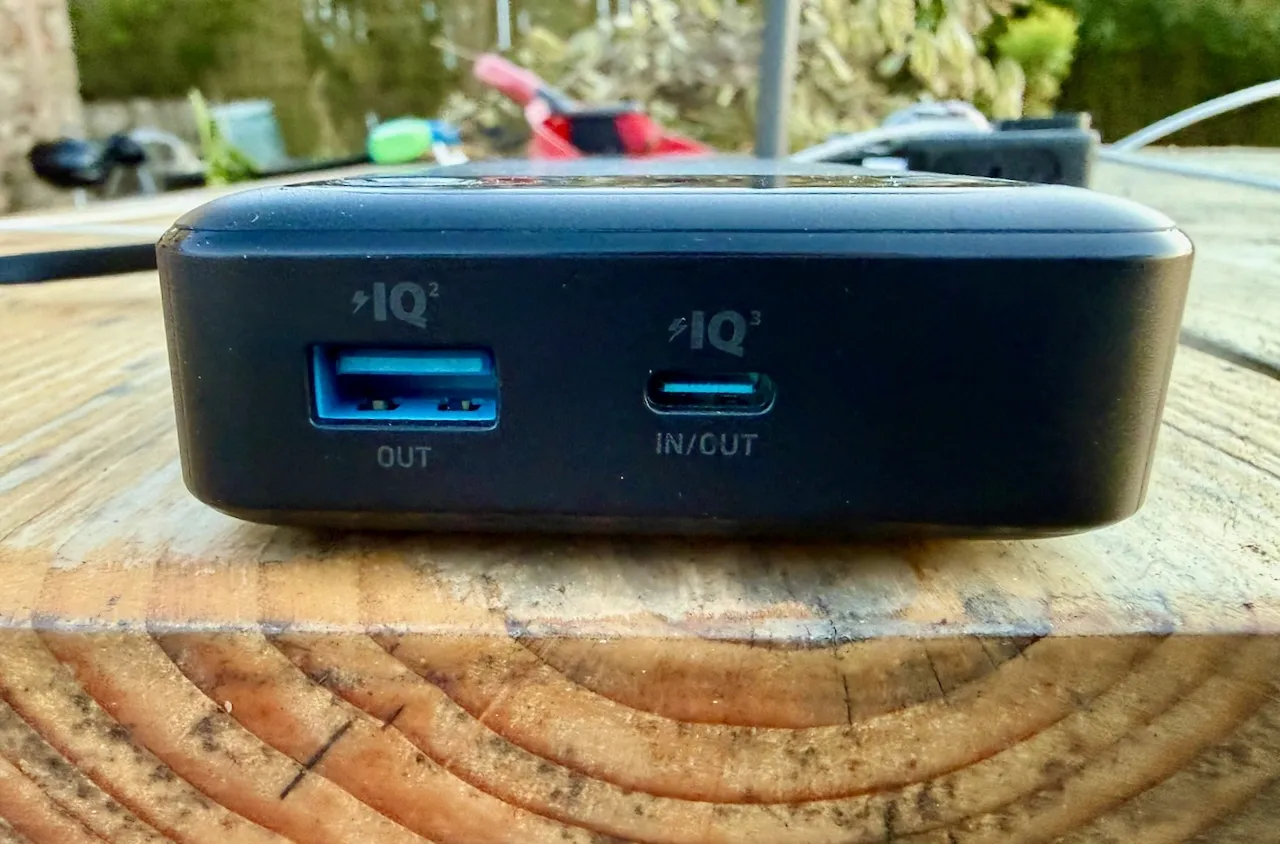
    Close up of the two ports on the end of the Anker battery - 1 x USB C and 1 x USB A.  There is an additional  built in USB C cable unseen in this image.

    What I found

    iPhone performance

    In normal use, the battery delivered around:

    2.7% of iPhone charge for every 1% of battery used

    In practice, that works out at:

    roughly 2.4 to 2.7 full charges

    With the phone in flight mode, the picture changes:

    around 3.7% of iPhone charge per 1% of battery

    That is an improvement of roughly:

    35 to 40 percent – well worth having on a camping trip.  

    What that means in real life

    A simple way to think about it is to compare how much charge you get with how much you use each day.

    From my testing:

    * Normal use gives about 240% total phone charge

    * Efficient use i.e. flight mode gives about 300%

    Worked example

    If you use around 60% of your phone battery per day, for example from 90% down to 30%:

    * 240 ÷ 60 = 4 days of use

    * 300 ÷ 60 = 5 days of use

    That matches what I saw in practice.

    Apple Watch

    The Apple Watch barely registers.

    Each 1% of the battery delivered around 14 to 15% of charge to the watch.

    In practical terms, you can charge it well over a dozen times and not worry about it.

    MacBook Air

    The MacBook is a different story.

    Each 1% of battery delivered less than 1% to the laptop.

    That is enough for a useful top-up, but not a full recharge.

    iPad Air

    The iPad sits somewhere in between.

    Each 1% of battery delivered around 1.8 to 1.9% to the iPad.

    That works out at roughly one and a half to two full charges.

    The last 10 percent

    One consistent finding was that the final 10% of the battery was not meaningfully usable.

    Across multiple tests, that last portion delivered little or no practical charge.  It is best treated as reserve rather than capacity.

    Flight mode insight

    The most interesting finding from all of this was the impact of flight mode.

    With the phone connected normally, part of the energy is constantly being used for background activity. Syncing, notifications, general housekeeping.

    Switching to flight mode removes most of that.

    The result is a noticeable increase in charging efficiency. Not theoretical, but measurable.

    It is a simple trick, but worth remembering if you are trying to stretch things over several days.

    Verdict

    This is a well thought out, practical piece of kit.

    It does exactly what you want from a power bank. It is reliable, fast to recharge, and gives you a clear idea of how much capacity you have left.

    In real-world use:

    * Expect around 2.5 to 3 phone charges

    * More if you are careful with how you use it

    * Enough capacity for a long weekend off-grid without worry

    The built-in cable and percentage display are small details, but they make a difference in practice.

    If you are heading away from reliable power for a few days, this is a sensible thing to take with you.

    Check price on Amazon

    As an Amazon associate, I earn a small commission from qualifying purchases but they do not cost you a penny extra.  

    I buy all my own gear and write independent reviews. If you found this helpful,buy me a coffee.

  • Starlink in Rural Cumbria

    Starlink in Rural Cumbria

    A Real-World Review for UK Remote Workers

    We have had Starlink since December 2024, it has genuinely transformed life for us. I explain more about our experiences below but if you are looking to sign up yourself, this referral link will give you a month of free service (and a small reward for me).

    We live over a mile from the nearest fibre connection. Getting workable internet here has been frustrating  and at times impossible, though a price worth paying for living in such an extraordinary place.

    We started with BT copper. Speeds hovered around 1 Mbps on a good day. If the neighbours attempted to go online at the same time as us, it simply fell over.

    We moved to Solway Communications. Initially promising – around 15 Mbps, but after a takeover the service deteriorated to barely better than BT.

    Then we tried 4G. An external aerial occasionally delivered 40 Mbps. The problem was consistency. Weather and network demand ruled everything. It would fail at exactly the moment guests arrived and we tried to stream a film.

    Back in 2012, patchy internet was inconvenient.

    In 2026, it sits somewhere alongside water and electricity.

    I work from home. Video calls must not drop. Files must upload. We stream all television. The air source heat pump follows its schedule via Wi-Fi. The Ring doorbell depends on it.

    Reliable internet is no longer optional.

    If fibre ever reaches us, I would reassess. Until then, we needed something that simply worked.

    youtube placeholder image

    Installation

    In December 2024, we took the plunge.

    I arrived home at around 7pm to a large box of kit, and, like a child at Christmas, installed it immediately, by torchlight.

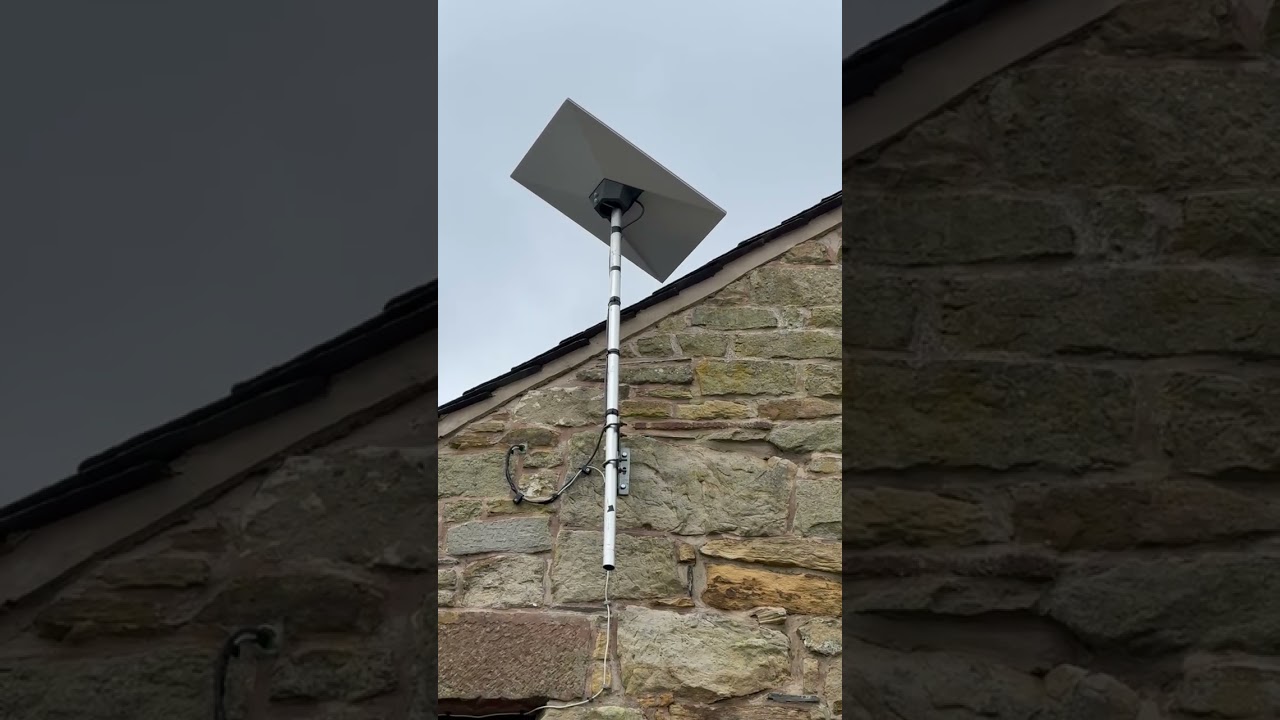
    The dish now sits high on the gable end, mounted on a pole. The cable runs through existing conduit into the bedroom.

    Setup is straightforward:

    • Download the Starlink app

    • Connect to the router

    • Use the in-app alignment tool to optimise positioning

    Screenshot from my starling app showing the obstructions tool - in here there is clear view of the sky in all directions.

    It requires an unobstructed view of the sky. Ours faces roughly south. If you’re concerned about obstructions, you can download the app in advance and use its sky-scanning tool from your proposed mounting point.

    The dish sits almost horizontal and includes a built-in heater that activates automatically to melt snow — a detail that matters in the UK.

    It is, essentially, install-and-forget technology.

    Performance

    Reliability has been exceptional.

    Unlike my old EE 4G setup  which required constant rebooting and adjustment, Starlink has simply stayed up. Uptime feels around 99.9%.

    Download speeds:

    Screenshot from my speed test app - 191.5 Mbps download and 24.2 Mbps  upload ping 19ms jitter 2.7ms data 246mb

    • Typically 100–250 Mbps

    • Occasionally up to 300 Mbps

    • Rarely below 50 Mbps

    Upload speeds:

    • Usually 10–25 Mbps

    We routinely run two 4K streams while I’m on a video call, with no noticeable degradation.

    Speeds vary slightly with weather and demand, but nowhere near as dramatically as 4G did.

    Automatic software updates occur occasionally around 3am, briefly disconnecting the service.

    For remote professional work in rural Cumbria, it has been completely dependable.

    Power Consumption

    In normal operation, our dish draws roughly 30–40 watts.

    During snow melt, it draws more temporarily.

    For comparison:

    • Typical fibre ONT + router: ~10–20W combined

    • 4G router setup: ~10–25W

    • Starlink: roughly double typical fibre consumption

    In annual terms, 35W continuous equates to roughly 300 kWh per year. At typical UK electricity prices, that’s approximately £70–£90 annually.

    It’s not insignificant. But in the context of running a rural home  and compared to the productivity it enables — it feels entirely reasonable.

    Wi-Fi & Integration

    The router allows easy customisation of SSID and password via the app. I reused my previous network name so all devices and visiting friends  reconnected seamlessly.

    Coverage is good. However, due to the thick walls and layout of our converted barn, I added a £55 Starlink mesh node which has integrated seamlessly.

    Cost

    When we signed up:

    • Equipment: ~£350

    • Monthly fee: £75

    There was only one plan available at the time.

    Now, UK residential plans start from around £40 per month, depending on service tier and region. In some cases, equipment and professional installation are included. I’ve recently downgraded us to the “middle” package for £60 a month without any loss of function that I can detect.

    Final Thoughts

    Starlink has transformed life here.

    It has enabled a fully remote professional career, reliable streaming, smart home functionality and general peace of mind.

    It is more expensive than fibre and uses more power. But where fibre does not exist, it is not merely a luxury, it is proper infrastructure.

    Since I first published this article, Fibrus have installed fibre to within 100m of our house and then given up! With no alternative plan in place we are still very gratefully Starlink customers.

    A Note on the Referral Link

    If you decide to try Starlink, you’re welcome to use my referral link below. You will get one month of free service and I will get a small reward.

  • Air Source Heat Pump: Five Years of Real-World Data

    Air Source Heat Pump: Five Years of Real-World Data

    We have lived in the same house for 12 years.  We had an oil boiler for 7 years, and 5 years ago, we changed over to an Air Source Heat Pump.  I am sharing my data on oil and electricity consumption to help you decide whether this is for you.     

    My full dataset and calculations are available here:

    In conclusion

    • Over 7 years, our boiler used 5.02 litres of oil per day
    • Over 5 years, our heat pump used 13.01 kilowatt hours of electricity per day
    • Both systems delivered broadly the same amount of heat into the house in real-world use (around 43–47 kWh per day)
    • We made no major changes to radiators, plumbing or insulation in this time period
    • To compare costs yourself: Price × 13.01 (heat pump kWh/day) and Price × 5.02 (oil litres/day)
    • At 4 September 2026 benchmark prices -approximately £1.01 per litre for heating oil and 26.11p per kWh for electricity, the heat pump would cost about £3.40 per day, compared with £5.09 for oil: an indicative saving of roughly 33%. Prices vary by tariff, region, oil order size and date.
    • Real-world, same-house comparison using measured data (not manufacturer estimates)

    Living off gas in rural Cumbria – costs, comfort and what actually changed.

    As I often say, we live in an old barn on the side of a hill in the Lake District. We have no fibre broadband, no mains sewage and no gas. Each of those has presented its own challenges, most of which I’ve enjoyed solving and writing about (see my pieces on Starlink and our sewage tank).

    Today I want to share our experience of installing and living with an air source heat pump (ASHP).  

    Our house

    The building dates from the 1800s however it was converted into a house in 2008 and has very good insulation.  We have underfloor heating in every room.  The EPC was a C before we got the heat pump fitted.  It’s 4 bedroom, 2 story, 181 square metres and, according to the EPC, the primary energy use for this property per year is 134 kilowatt hours per square metre (kWh/m2).  

    The old boiler

    In 2013, when we moved in, the house came with an oil boiler and a large 1,200-litre green plastic tank in the garden.

    Our old plastic 1200 litre oil tank.  It's the size of a small car.

    The system was relatively new and worked well with our underfloor heating. We kept it for just over seven years. The boiler was serviced annually but began breaking down once or twice a year. Replacement was inevitable. The question was whether to install another oil boiler or try something different.

    Why We Switched

    In 2021 the government was offering a £5,000 installation grant plus Renewable Heat Incentive payments of £188 per quarter for seven years. That made the economics worth examining.

    As I say, our house is well insulated and heated entirely by underfloor heating, which makes it well suited to a heat pump. Heat pumps operate at lower flow temperatures often around 30–45°C for underfloor systems (sometimes higher in older radiator setups) whereas many boiler systems feeding radiators are typically set around 60–70°C, and historically were often run hotter. Lower temperatures are key to heat pump efficiency, but they require a larger heat-emitting surface area either oversized radiators or, ideally, the whole floor.

    I obtained three quotes and chose the middle option at just over £10,000. The grant paperwork required some administration but nothing excessive.

    There is currently a government Boiler Upgrade Scheme offering up to £7,500 towards the installation of an air source heat pump. Full details and eligibility criteria are available on the official GOV.UK website

    Installation

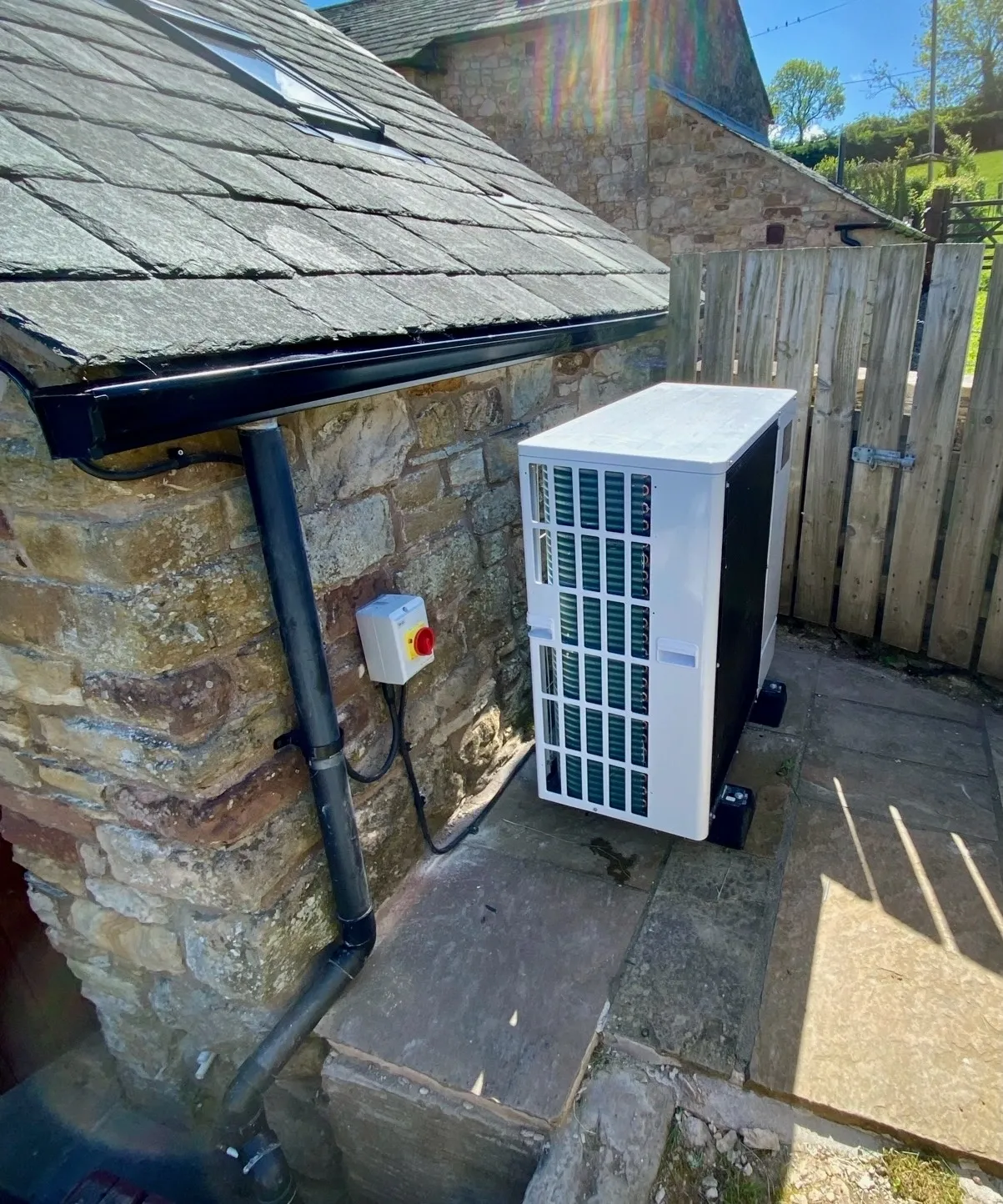
    The outdoor unit was positioned close to where the oil tank had stood, allowing the flow and return pipes to pass directly through the wall into the utility room.

    The new cylinder went where the previous hot water tank had been. Because the boiler and tank were already in that space, the plumbing alterations were relatively straightforward.

    Electrically, a heavy-gauge steel wire armoured (SWA) cable had to be run from the consumer unit to the outdoor unit. The installers routed it neatly and discreetly.

    We opted for the Wi-Fi module and a wireless thermostat to allow remote monitoring and scheduling.

    The installation took four days and went smoothly.

    The indoor part of a domestic heat pump - this is the 1000 litre hot water tank with associated plumbing and cabling.

    Five Years of Data

    We are now 1,800 days in.

    The dedicated electricity meter shows the heat pump has used 23,409 kWh.

    That averages:

    • 13.01 kWh per day

    • 4,752 kWh per year

    Running Costs

    Oil averaged £2.31 per day over seven years between 2014 and 2021.  

    Across the period measured, our electricity averaged approximately 19p per kWh on Octopus Agile. At that rate, the heat pump cost around £2.47 per day.

    That is close to parity, and that’s while maintaining a constant 18°C, warmer and more stable than we previously ran the house.

    Direct comparisons are complicated because both oil and electricity have been volatile.

    Oil prices rose sharply after 2022, at times approaching £1 per litre. Electricity prices also increased, but we chose Octopus Agile, which allows us to shift usage away from peak periods. With timer control this has been straightforward.

    At today’s local prices 105p per litre for oil and 24.67p per kWh for fixed electricity — the heat pump works out at roughly 39% cheaper per unit of delivered heat.

    If you’re running on oil, you’ll know that refilling often happens either side of Christmas. When prices were at their worst, a delivery could easily be £800–£1,200. The ASHP doesn’t eliminate winter spikes, electricity bills are still higher between December and February but I smooth that by paying a standing order into a savings account throughout the year.

    We use Octopus Energy

    I’ve been with Octopus for around eight years and have used their Agile tariff to shift our heat-pump use away from expensive peak periods. If you’re thinking of switching, you can get £50 credit using my referral link — and I’ll receive £50 too.

    Referral link. Terms and eligibility apply.

    Comfort and Experience

    The house has never been more comfortable. It maintains a steady 18°C with small fluctuations above and below set point. The internal environment feels more stable and humidity is lower.

    Unless it is very cold, the unit does not run continuously; it cycles efficiently to maintain temperature.

    The hot water performance has been equally effective. I have programmed it to regenerate the tank once per day, which comfortably supports three to four showers plus normal domestic use. Larger households would configure this differently.

    Unlike a boiler, you cannot raise the temperature of the house quickly on a whim. It rewards planning. If elderly relatives are visiting, dial in extra heat the day before.

    Maintenance has been minimal. I replaced two expansion vessels myself for around £100 in parts. The oil boiler, by contrast, required annual servicing and regular call-outs.

    One practical downside is that it can be difficult to find engineers willing to service domestic heat pumps. Our original installer appears to have ceased trading.

    The Practical Differences

    • The oil tank is gone.
    • There is no smell.
    • No checking levels in winter.
    • No deciding how much to order.
    • No tanker deliveries.
    • No large lump-sum fuel payments.
    • The system simply runs. It cannot “run out” in the way an oil tank can during a cold winter.
    • We have regained a space the size of a small car where the oil tank used to be.

    Future Potential

    I have recently installed a small plug-in solar system, with a full blog about it to follow. The early results have been remarkably encouraging. In just three months, two 500 W panels on my shed roof have generated more than 220 kWh of electricity  despite being on the wrong side of a hill in the North of England.

    For context, MELCloud records my heat pump as using 589 kWh for domestic hot water over the last 12 months. In just three months, those two solar panels have therefore generated the equivalent of 37% of an entire year’s hot-water electricity — around 136 days’ worth.

    That doesn’t mean every one of those solar-generated kilowatt-hours actually heated our water — generation and demand don’t always coincide — but it illustrates the potential rather nicely.

    In future, I plan to add a full rooftop solar array and battery storage. When I do, the economics should tilt further in favour of the heat pump. Oil offers no comparable flexibility.

    Verdict

    We have not halved our heating bills.

    But we have:

    •  Stabilised running costs
    •  Increased comfort
    •  Reduced maintenance
    •  Removed fuel logistics
    •  Reduced exposure to oil price spikes
    •  Gained future flexibility

    For our house, the decision has proved sound.

    Found this useful?

    I write these articles independently, based on things I’ve actually bought, used and lived with. If this five-year heat-pump comparison has helped you, you can support the site by buying me a coffee.

    ☕ Buy me a coffee on Ko-fi

  • Apple Watch Ultra 3

    Apple Watch Ultra 3

    (Affiliate link)

    TL;DR

    •  Battery life is the breakthrough — around 42 hours in real use.
    •  Proper outdoor features: satellite SOS, cellular, waypoints, Backtrack.
    •  Big, bright screen that’s actually useful.
    •  Expensive, and large — try one on first.
    •  If you’re active outdoors, this feels like equipment, not a gadget. 

    Why I Upgraded

    My Apple Watch Series 7 had reached its limit.

    Battery life was under 24 hours even when new. If you wanted sleep tracking, you had to plan your charging around bedtime. A 4–5 mile walk drained it heavily. Kayaking often meant leaving it at home and wearing my old Casio G-Shock instead. The screen had also become frustratingly unresponsive when wet.

    I looked at alternatives. I briefly considered a Tag Heuer, but I didn’t want to abandon seven years of health data. Rings and other wearables didn’t appeal.

    When the new Apple range launched in September, the Ultra 3 ticked every box. I ordered one immediately.

    youtube placeholder image

    What It’s Like in Real Use

    Battery life is the headline. I consistently get around 42 hours. That means full sleep tracking, workouts, mapping, and daily use without thinking about it. I charge it while drinking my first cup of tea at my desk. That’s it.

    On a recent 2hr 41min winter hill walk in freezing conditions, the battery dropped from 65% to 47% — an 18% reduction. My old watch would not have survived.

    The larger, brighter screen makes mapping, messages and email genuinely usable. The titanium case and sapphire glass feel properly durable. It still deserves care, but this should look respectable after years of normal use.

    The Action Button is simple but genuinely helpful. I use it to start workouts. Small thing, big difference when you log at least two sessions a day.

    The outdoor features are not gimmicks. Compass Backtrack and Waypoints are genuinely useful in fog, on tidal beaches, or when marking a launch point while kayaking. Cellular connectivity means I can head out without my phone and still feel safe.

    Author's photograph of the Ultra 3 watch in navigation mode - compass directions indicated as well as waypoints such as the summit of a mountain a short distance ahead.

    Health and Vitals

    Sleep tracking is excellent. Apple’s Vitals feature now monitors wrist temperature, breathing rate, heart rate, blood oxygen and more. After a few days it learns your baseline and flags deviations.

    It has already proved useful. After a heavy meal and too much wine, I saw a noticeable dip in overnight blood oxygen. Before a cold, it detected a raised temperature before symptoms appeared.

    It doesn’t diagnose conditions, but it highlights patterns. Over time, that insight adds value.

    The Milanese Loop

    I made a mistake ordering the blue Ocean Band. It just wasn’t classy enough for a watch like this.

    I replaced it with the natural titanium Milanese Loop and wish I’d chosen it from the start. It’s warm to the touch, light, breathable and looks superb. I’ve only taken it off to charge the watch.

    If you like the Milanese Loop, order it with the watch and save yourself £100.

    The Quirk

    If you wear it in the bath, it congratulates you on a 9cm “dive” and tells you the water temperature. It also triggers Water Lock automatically, which is mildly irritating.

    It’s funny the first time.

    youtube placeholder image

    Downsides

    • It’s large. Try one on before committing.
    • Apple straps are expensive.
    • If you’re mostly sedentary and indoors, this is overkill.

    Verdict

    Strong recommendation.

    If you’re physically active and spend time outdoors, this stops being a smartwatch and starts being equipment. The battery life alone changes how you use it. Everything else builds on that.

    If you’re considering one, you probably won’t regret it.

    You can see the exact version I use on Amazon via this button:

    As an Amazon Associate, I earn from qualifying purchases at no extra cost to you.

    I buy all my own gear and write independent reviews. If you found this helpful, buy me a coffee.

    Thanks for reading, I’d love to read your comments.

  • Anker 100W 3-Port USB Charger Review

    Anker 100W 3-Port USB Charger Review

    youtube placeholder image

    (Affiliate link)

    TLDR

    •  This is a premium charger that is ideal for both travel and everyday use.
    •  100w total power – that’s enough to run a laptop and charge 2 x other devices simultaneously 
    •  2 x USB C ports and 1 x USB A
    •  Folding prongs for ease of transport
    •  Live display of runtime, power usage and temperature
    •  Outlets at the bottom – could be tight depending on how close to the floor your sockets are
    •  In my opinion, a substantial upgrade on the chargers provided by Apple.
    •  Trusted brand – ideal for your high value tech. 
    Anker 100w 3 port charger viewed from the side with the brand name and 100w designation shown.

    Review

    I’m away from home several times a month and I  travel with a laptop, tablet, iPhone, Apple Watch and more.  I previously lugged a four-gang mains extension socket around with me. I decided to treat myself to this – a single plug that can run a laptop and simultaneously charge my phone and watch.  

    It’s a very good quality product – reassuringly heavy. The plug pins fold flat for ease of packing. It’s got an LED readout on how much power each device is using, total running time and its temperature. It is way more powerful than the charger that comes with an iPhone or iPad. meaning you can charge up much quicker.  

    It uses GAN  (Gallium Nitride) technology, allowing high power output from a smaller, more efficient unit that runs cooler than older silicon-based chargers

    At 100W, this is powerful enough to run and charge most modern laptops while still handling smaller devices.

    I have now  taken this on dozens of trips and use it as my main charger, I am really impressed with it and I’d happily rely on this as my only charger when travelling. 

    You definitely get what you pay for, it’s a little more expensive than Apple’s own charger but it is a lot more powerful and it will run multiple devices.  You can get cheaper devices of similar spec but this is not an area where you should cut corners – there is always the risk of damage to your expensive devices and the risk of overheating.  

    It comes with a good quality USB C-C cable.

    Best for / Not for

    Best for: travelling with multiple devices

    Not for: charging a single phone overnight (it would be overkill)

    Be mindful that the outlets are at the bottom, if your wall socket is close to a shelf / the floor it might be a squeeze for the cables.  Personally I much prefer this to looking at messy wires. 

    As an Amazon Associate I may earn a small commission from qualifying purchases at no extra cost to you.

  • Anker Solix C1000 Portable Power Station Battery Storage

    Anker Solix C1000 Portable Power Station Battery Storage

    (Affiliate link)

    TLDR

    • I’ve had my C1000 since May 2025, it has already kept my Starlink and office setup online through 6 power cuts
    • It’s portable and versatile, you can run power tools offgrid or even use it for car boot cooking 
    • There is a newer version on sale, this one is heavily discounted and still more than capable
    • Anker are a high quality brand, you can trust this device not to damage your tech and to withstand normal use. 
    • It has excellent solar integration, you can source your own panel and connect it easily
    • Rapid recharge time from the mains
    • Generous amount of sockets – USB C, USB A, 12v and 240v
    • It won’t run a normal kettle – it trips out at about 2kw but it will run an air fryer or hot chocolate machine easily 
    • If you are in the market for a backup battery / generator definitely put the C1000 on your shortlist, I am very happy with mine. 

    Situation – why we needed the C1000 in our lives:

    We live in a house sat between four fields on the side of a hill in the Lake District. We are 4.5 miles from the closest shop, a similar distance in the other direction from a pub, and right at the end of the line for power supply. We still do not have fibre broadband.

    All of this is great as far as I am concerned – in fact, it’s exactly what we were looking for when we moved here. It does mean we have to be able to take care of ourselves and solve problems on a fairly regular basis.  

    I am a professional remote worker. I do a few different jobs and they all depend entirely on being able to get online and operate IT equipment. I cannot earn without that infrastructure in place.

    youtube placeholder image

    It was never really much of a problem until January 2025. Prior to that, we would have the occasional power cut, especially in storms, but by the time I had boiled the kettle on the gas hob, we were up and running again. In January, there was extensive damage to the high-voltage grid in Cumbria, and the recovery teams simply could not get around to all of them. We were off for just under 48 hours. Fortunately, it was at the weekend, so it did not affect work, but we did lose most of our frozen food, and it got us thinking.

    I tried hooking an old camping inverter up to the battery of my Volvo with the engine running. It was enough to get the LED displays of the fridge-freezer to come on, but not the compressor.

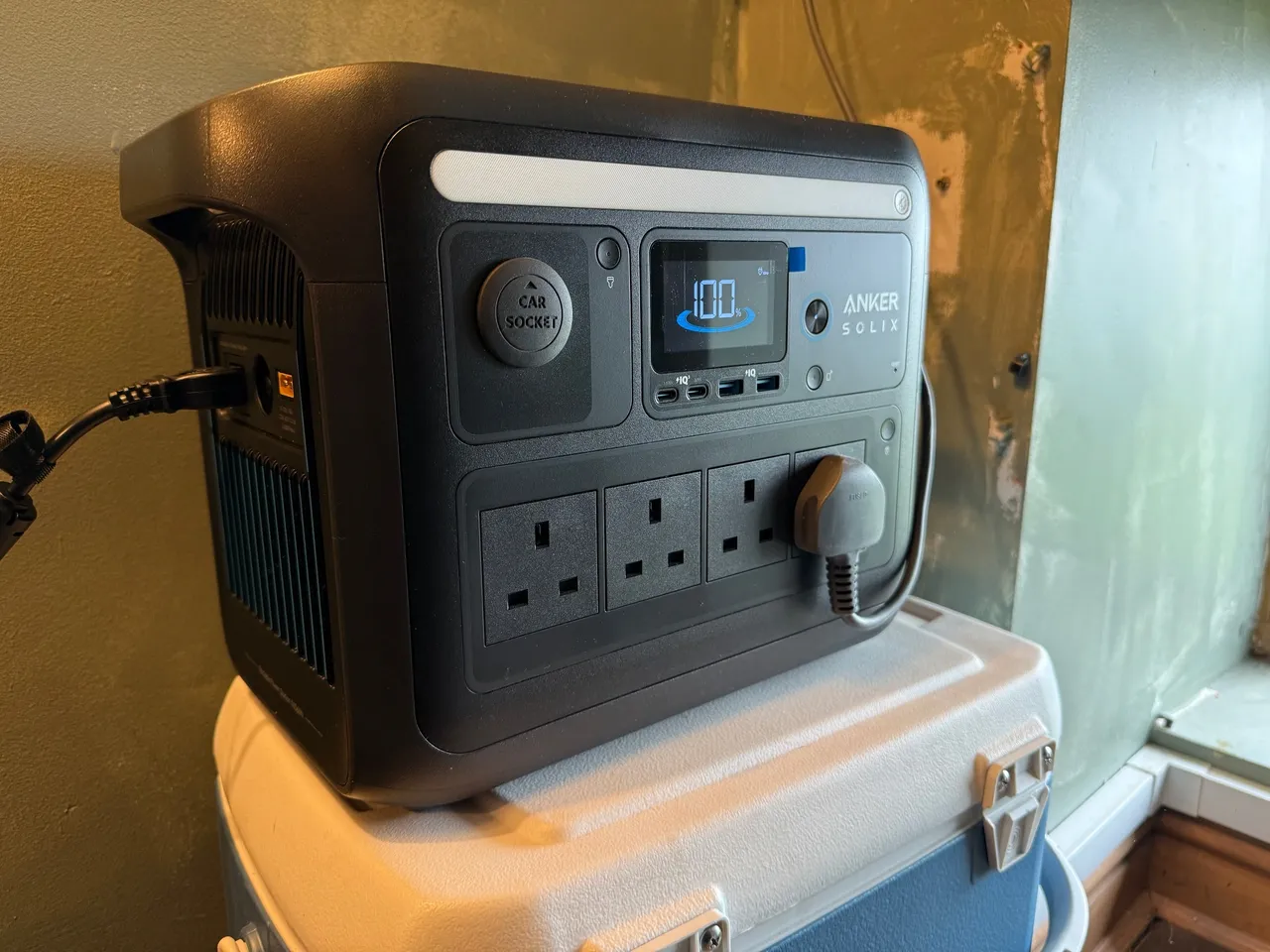
    Anker C1000 operating a Ninja air fryer battery level shown as 100%

    I looked into getting a generator – petrol or diesel. You don’t really get much for less than £1,000, and then you have to keep it somewhere, replenish the fuel to stop it going off, and run it every month to keep it in good condition. It has to be outdoors when running, and not all of them are weatherproof. It’s another engine to service with oil changes, spark plugs, and so on. And the noise.

    I thought about professionally installed house batteries – tempting, as I could benefit from cheap overnight electricity on Octopus. These systems don’t necessarily provide backup power in the event of a cut, and they are certainly not cheap.

    Anyway, spring continued and I forgot about it for a while – until the electricity company wrote to me to say the power would be going off for repairs for the whole of a Monday in May. I made plans to work from my wife’s office. It wasn’t a great day – I felt in the way and I didn’t get much done. So I went back to making my own backup plan. A portable power station made so much sense for what I needed.

    C1000 Specifications:

    The Anker C1000 holds 1056Wh– one kilowatt-hour (kWh), in other words. That’s enough to run a 1kW electric fire for about 50–55 minutes, or a 100W light bulb for around nine hours once you allow for inverter losses. In my case, it’s plenty to run my Starlink setup, laptop, and external screens for seven or eight hours. If I wasn’t running my full complement of office equipment, it would run Starlink for a good 15–18 hours.Alternatively, you could use it to cycle the fridge-freezer every few hours and to run room lighting. If you’re wise with it, that 1kWh can go a long way and make the difference between surviving and being relatively comfortable.

    The C1000 can deliver 1800W continuouslyand up to 2400Wfor a short surge. It can recharge to full in as little as 58 minutes, and the battery technology is good for 3,000 cycles to 80% capacity – roughly ten years of normal use. It has 9 output ports, including two USB-C, two USB-A, four 240V mains sockets, and a 12V car “cigarette lighter” style port. You can charge it from solar panels if you have them, and it will also accept input from a car 12V system. It comes with a car charging lead, some solar adapters, and a 240V mains lead.

    I talked myself into the idea pretty easily in the end – no fuel to worry about, no noise, no maintenance. I also liked the thought of taking it on camping trips – not something you could sensibly do with a generator.

    youtube placeholder image

    My Review:

    I have had mine for a year now, so I feel qualified to give it a considered review.

    I have used it “in anger” for six power cuts, one of which lasted 7 hours, it was more than capable of running my work setup. Several of the cuts we’ve had so far were short but featured the power coming off and on again a few times before stabilising – very annoying if your router has to power cycle each time before reconnecting. I found the C1000’s uninterruptible power supply mode very useful here. You plug the C1000 into the mains, turn it on, then plug your router and computer into it, and it prevents any issues when the mains supply flickers.

    I keep the C1000 near our router with a long extension cable next to it. When the power goes off, I plug the router straight in. By the time I’ve run the extension to my computer, the Wi-Fi is back on and I can carry on with my day, only losing a couple of minutes.

    I’ve found quite a few other great uses for it:

    DIY – When doing electrical work with the power off, I can still run my drills, multitools, and lamps from the C1000. Ideal for chasing in new sockets and fault-finding.

    Outdoor DIY – We own a little bit of land, and quite often I need to run a power tool out of range of the house. The C1000 has been more than happy to run drills, cutting tools, and a table saw out and about.  

    Leisure – I’ve run a Hotel Chocolat Velvetiser in the boot of my Volvo and provided hot chocolate to friends. You could easily run an air fryer from it too (though not a normal kettle – they’re 3kW).

    Vehicle / machinery – the 12v “car cigarette lighter” output runs my tyre compressor, very handy if I’ve got more than one tyre to inflate or if I’m pumping up the tyres on my lawn tractor which does not have an outlet.  The compressor draws about 120w and soon takes the edge of the vehicle battery whereas the C1000 drives it hard for as long as you need.  

    Anker C1000 set up outdoors on a picnic table with a small solar panel providing power

    I’ve also been experimenting with solar power. I found an old 190W solar panel and was able to get a connector from Amazon for about £15. I was surprised how well it worked – the telematics on the C1000 showed it delivering up to 157W in direct sunlight. A larger 400W panel could recharge the C1000 in around three to five hours of good light. Even my small panel is enough to provide more than I use with my Starlink system and computer.  If I was away camping, I think leaving that set-up would keep us in business for mobile phone and iPad charging for a week easily.

    Screenshot from the Anker C1000 smartphone app showing battery percentage and DC input 157w from a solar panel

    In normal use, I have it plugged into a smart socket in our wardrobe. I’ve set a reminder on my calendar to charge it up every three months or so, to make sure it’s ready to go when needed. It also means I can flick it on if it seems likely there’ll be a power cut.

    The C1000 has a few other features that I appreciate. There’s a good smartphone app that lets you update the firmware, remotely turn it on, or read its telematics. This is very useful when it’s running, as you can keep an eye on remaining battery power and even the performance of your solar if you have it. I also like that you can set the mains charging speed – I’ve turned mine down to 400W to be gentler on the battery and reduce fan noise. If I was in a hurry, I could turn it up to ultra-fast. I never thought I’d use the built-in LED strip light, but I must admit, it’s been really useful a few times.

    The unit itself is very well designed. It’s heavy, but it has two solid carrying handles at the top. It feels premium, built to last. I note that you can buy an extension battery to double the capacity if needed.

    All considered, I am extremely pleased with my C1000 and I highly recommend it.

    My own device is the first generation C1000, it is no longer on sale so my Amazon UK links will take you to the new model which looks even more impressive.

    As an Amazon Associate, I earn from qualifying purchases.

    Anker C1000 ready to go in the author's cupboard

    Thank you for reading, I’d love to hear your comments via the box below.